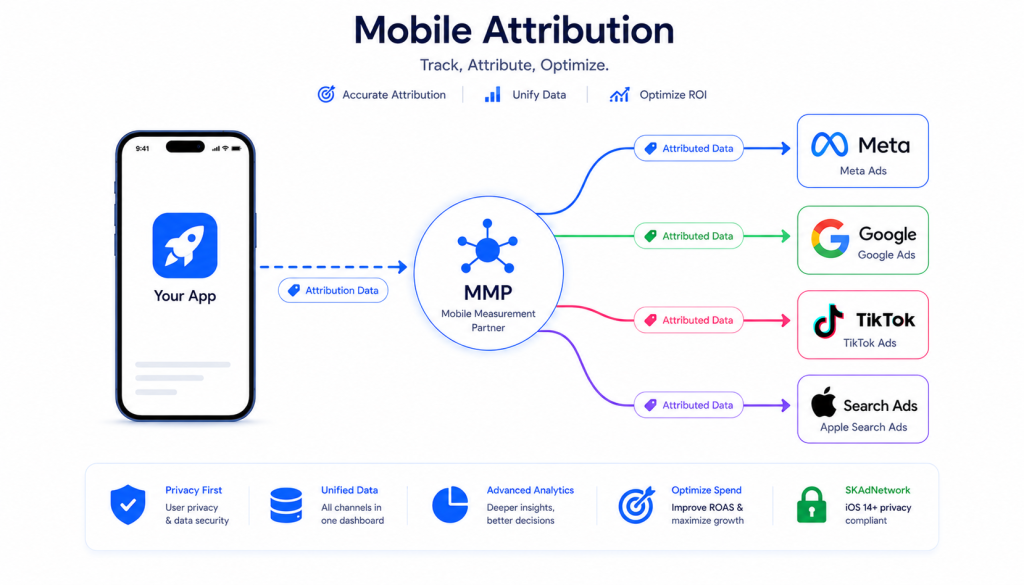
What is Mobile Attribution? Complete Guide (2026)
Table of Contents
ToggleMobile attribution sounds simple until you try to implement it. Most app teams either set it up wrong or never learn what happens underneath, and then make budget decisions on numbers they cannot trust.
This guide covers what is mobile attribution, how it works step by step, the concepts that actually matter, and how iOS and Android now differ after Apple’s privacy changes and Google’s decision to wind down Privacy Sandbox on Android.
What Is Mobile Attribution?
Mobile attribution is the process of identifying which marketing channel, campaign or ad creative drove a specific user action in a mobile app, most often an install, a registration or an in-app purchase.
When someone sees your ad, taps it, installs your app and makes a purchase, attribution connects those events into one journey and assigns credit to a source. Without it, you know your campaigns are running but you have no reliable way to tell which ones work. Where you spend, which creatives you scale and which channels you cut all depend on that credit being assigned correctly.
Why Mobile Attribution Matters
Without attribution you are buying users blind. You can see what you spend per channel, but not what each channel returns. Four things go wrong in practice:
- Wasted budget. Ad platforms optimize toward the conversion signals they receive. If events are missing or credited to the wrong source, Meta and Google are optimizing on bad data, and you scale what looks good in the ad dashboard rather than what earns.
- Blind scaling. Without an independent source of truth, each network counts the installs it touched, so the sum of reported conversions can exceed your real install count by a wide margin.
- No LTV by channel. If revenue events are not attributed, you know your cost per install but not your revenue per install by source. Those two numbers together decide whether a channel is profitable.
- Unreliable retargeting. Re-engagement segments depend on knowing which users came from where and which events they completed. Broken attribution means broken audiences.
How Mobile Attribution Works, Step by Step
The sequence is consistent across every mobile measurement partner:
- A user taps your ad on Meta, Google, TikTok or any other network.
- The network records the click and appends parameters, usually including a click identifier specific to that network.
- The click lands on a tracking link managed by your mobile measurement partner, which logs the click, the timestamp, the device signals it is allowed to collect and the channel.
- The user installs the app after being sent to the App Store or Google Play.
- The SDK fires on first open. The measurement SDK inside your app reports the install with whatever identifiers the platform’s privacy framework allows.
- The install is matched to a click, either deterministically through a device identifier or, where the platform permits it, probabilistically.
- Credit is assigned to a channel, campaign and creative, and a postback goes back to the ad network so it can optimize.
- In-app events are tracked after that, from registration to purchase, and attributed back to the original source. This is where channel-level revenue comes from.
On iOS a second, parallel path runs alongside this one, which the iOS section below explains.
Key Mobile Attribution Concepts
Attribution Window
The attribution window, or lookback window, is how long after an ad interaction an install can still be credited to it. Install later than that and it counts as organic.
AppsFlyer’s attribution lookback window documentation gives a useful reference: the default click-through window is 7 days and can be set from 1 to 30 days, and the default view-through window is 24 hours with a range of 1 to 24 hours. Other partners use similar defaults. Mismatched windows between your measurement partner and your ad network are one of the most common causes of reporting gaps.
Deterministic vs Probabilistic Attribution
Deterministic attribution matches a click to an install using a unique identifier, such as the Google Advertising ID on Android or the IDFA on iOS when the user has allowed tracking. When that identifier is available on both sides, the match is certain.
Probabilistic attribution, often called fingerprinting, estimates a match from non-unique signals such as IP address, device model, OS version and timing. It is less precise, and on iOS it is not allowed. Apple’s user privacy and data use page states that you may not derive data from a device for the purpose of uniquely identifying it, and names browser and device configuration, location and network connection as signals that fall under that rule. Apps that do this, or that include an SDK that does, can be rejected.
Attribution Models
An attribution model decides which touchpoint in a journey gets the credit:
- Last click. The final click before the install takes all the credit. This is the default almost everywhere.
- First click. The first interaction takes the credit, which is useful for seeing which channel introduces users to your app.
- Multi-touch. Credit is split across touchpoints by a rule such as linear, time decay or position based. It shows more of the path but is harder to act on.
- Data driven. Credit is assigned from historical conversion patterns. It needs enough volume to be stable, so small apps usually get little from it.
View-Through Attribution
View-through attribution credits an ad that was seen but not tapped, if the install happens inside the view-through window. It is the most argued-about setting in mobile attribution, because it inflates attributed installs and can make an impression-heavy channel look stronger than it is. Most teams keep the window short or turn it off where impression data is not trustworthy.
iOS vs Android Attribution in 2026
The two platforms no longer work the same way, and the gap has widened again this year.
iOS: ATT, SKAdNetwork and AdAttributionKit
App Tracking Transparency requires a permission prompt before your app tracks users across other companies’ apps and websites or reads the IDFA. Apple’s own documentation is direct about the consequence: without permission the advertising identifier returns all zeros and you may not track the user. Opt-in rates vary widely by app category, so a large share of iOS users is usually unavailable for device-level matching.
Apple’s privacy-preserving alternative sends aggregated postbacks instead. There are now two frameworks for this, and the direction of travel is clear. Apple’s SKAdNetwork documentation opens with a note telling developers to use AdAttributionKit for app ad campaigns on the App Store and alternative marketplaces. AdAttributionKit requires iOS 17.4 or later, supports re-engagement conversions as well as installs, and runs without an ATT prompt, as SKAdNetwork does. Apple also publishes an interoperability guide for the period where both are in use.
Either way the mechanics are familiar. From iOS 16.1, an advertised app can update conversion values across three conversion windows, which produces up to three postbacks. Adjust’s breakdown of how SKAdNetwork 4 works lists them as 0 to 2 days, 3 to 7 days and 8 to 35 days, with a 24 to 48 hour delay on the first postback and up to 144 hours on the later two. Only the first window can carry the fine conversion value, and only when Apple’s crowd anonymity tier allows it. The others carry a coarse value. One ad network receives the winning postback and up to five others receive a non-winning copy.
One detail is worth correcting because older guides get it wrong. The SKAdNetworkItems list in Info.plist belongs to apps that display ads. An app that only advertises itself does not need that list. What it may need is the endpoint key that lets the developer receive a copy of the winning postback. If your iOS numbers are off, the SKAdNetwork setup guide and the iOS attribution fix guide go through the real failure points.
Android: GAID and the End of Privacy Sandbox
Android attribution is still mostly deterministic. The Google Advertising ID is available for users who have not deleted it, which means device-level matching works for most installs. Apps targeting Android 13 and above must declare the com.google.android.gms.permission.AD_ID permission to access it, and Google’s advertising ID policy points to the app set ID for non-advertising uses such as analytics and fraud prevention.
The big change is what is not coming. Privacy Sandbox on Android was widely expected to become Google’s answer to SKAdNetwork. It is not. Google’s own Privacy Sandbox feature status page now lists Attribution Reporting for Android as scheduled for phaseout, along with Topics, Protected Audience, Protected App Signals, SDK Runtime and On-device Personalization, all classified as deprecate and remove. If you were holding off on an Android measurement decision until the Sandbox landed, there is nothing to wait for.
What Is an MMP?
A mobile measurement partner is a third-party platform that performs attribution for you. The point of an MMP is neutrality. Ad networks have an incentive to claim credit for installs they touched, so an independent layer that deduplicates across networks is the only way to get one consistent number.
The four names you will meet most often:
- AppsFlyer. The broadest ad network coverage. Start with the AppsFlyer setup guide, and see AppsFlyer vs Adjust for how it compares.
- Adjust. A clean dashboard and strong automation. The Adjust setup guide covers the current SDK.
- Singular. Combines attribution with ad spend data pulled from your networks, which removes the need for a separate cost aggregation tool. See how to set up Singular.
- Branch. Known for deep linking and web-to-app journeys. See Branch deep links setup.
All four integrate with the major networks and support Apple’s postback frameworks. Pricing models differ and vendors do not publish complete rate cards, so get a written quote that spells out volume limits, overages and add-ons rather than relying on numbers from a blog post.
An MMP is not an analytics tool. Attribution tells you where a user came from. Product analytics tells you what they did inside the app. Many teams run both, which is why a Firebase Analytics setup usually sits next to the MMP rather than replacing it.
Common Mobile Attribution Problems
Setups break in predictable ways:
- Gaps between the MMP and the ad platform. Some difference is normal, because the two count with different windows, different view-through rules and different deduplication. What matters is whether the gap is stable week to week. A gap that suddenly widens or flips usually means a configuration change, not a data problem.
- Too many installs landing as organic. On iOS this often means postbacks are not reaching the measurement partner, or the ad network is not registered as the attribution partner on its own side.
- Postbacks that never arrive. Apple sends these, not your app. If nothing has arrived, check the timing first, since the first postback can be up to 48 hours after a window that is itself up to two days long. After that, check that the app updates its conversion value and that the measurement partner is configured on the network side.
- Revenue events missing from the dashboard. Usually an event mapping error, a deprecated SDK method, or sandbox purchases being tested against a production setup.
- Install counts that look too good. Click flooding and install hijacking inflate numbers. Fraud rules exist in every major MMP, but they have to be switched on and tuned.
If you are seeing several of these at once, the mobile attribution audit guide is a structured way through them, and the free mobile app attribution debugger checks a payload against documented rules before you start changing code.
Choosing Your Mobile Attribution Setup
A practical way to decide:
- Starting out on Meta and Google. AppsFlyer or Adjust. Both document their setup well and handle Apple’s postback frameworks without custom work.
- Apple Search Ads is your main channel. Confirm your chosen partner supports Apple’s Ads Attribution API in addition to the postback framework, since the two give different views.
- Cost data across many networks matters. Singular is built around that use case.
- Deep links and web-to-app are central. Branch is the strongest option there.
- Your numbers already look wrong. Audit before adding tools. Most attribution problems are configuration problems in the setup you already have.
The short answer to what is mobile attribution is that it is the layer that makes paid user acquisition accountable. Get it right once and every later decision rests on something real.
FAQ
What is mobile attribution in simple terms?
Mobile attribution is how you find out which ad, campaign or channel brought a user to your app. It links an ad interaction to an install and to the events that follow, so you can tell which marketing actually produced revenue instead of guessing from ad platform numbers.
What is the difference between mobile attribution and mobile analytics?
Attribution tracks where users came from before they installed. Analytics tracks what they do inside the app, such as sessions, funnels and retention. They answer different questions and usually run side by side in the same measurement stack.
Do I need an MMP if I only run ads on one network?
If you run a single network you can often use its own reporting or Apple’s attribution API directly. As soon as you add a second channel you need a mobile measurement partner, because each network will claim credit for installs it touched and the totals will add up to more users than you actually have.
Is SKAdNetwork still used in 2026 or has AdAttributionKit replaced it?
Both exist. Apple’s SKAdNetwork documentation now tells developers to use AdAttributionKit for app ad campaigns on the App Store and alternative marketplaces, and Apple publishes an interoperability guide for the period where both are in use. AdAttributionKit requires iOS 17.4 or later, so campaigns still reach older devices through SKAdNetwork.
Does my app need SKAdNetwork IDs in Info.plist?
Only if your app displays ads from an ad network. Apple’s documentation assigns the SKAdNetworkItems list to source and publisher apps. An app that only advertises itself does not need that list, and may instead configure the endpoint key that lets the developer receive a copy of the winning postback.
Why do my MMP and ad platform numbers never match exactly?
They are not supposed to. The two sides use different attribution windows, different view-through rules, different deduplication logic and different timestamps for when a conversion counts. Watch the stability of the gap rather than the gap itself. A sudden change usually means a configuration change on one side.
Is Android attribution changing now that Privacy Sandbox is ending?
Google’s Privacy Sandbox status page lists Attribution Reporting for Android and the other Android Sandbox technologies as scheduled for phaseout. In practice that means Android attribution continues to rely on the Google Advertising ID and existing measurement partner integrations, and there is no Sandbox migration to plan for.
If your attribution numbers are not adding up, send your platform and a short description to contact@alfahadhridoy.com and I will reply by email.