Table of Contents
ToggleMobile Attribution Audit: The Complete Guide to Fix Tracking Issues (2026)
If your MMP dashboard numbers don’t match your ad platform numbers — you have an attribution problem. If your iOS installs dropped after ATT — you have an attribution problem. If your purchase events show iapinvalid errors — you have an attribution problem.
Most mobile app teams don’t realize their attribution is broken until they’ve already wasted thousands of dollars in ad spend on unreliable data.
This guide walks you through a complete mobile attribution audit — step by step — so you can find exactly what’s broken and fix it.
In this guide:
- What a mobile attribution audit is and why you need one
- The 7 signs your attribution is broken
- Complete attribution audit checklist
- How to fix the most common attribution issues
- Tools you need for a proper audit
What Is a Mobile Attribution Audit?
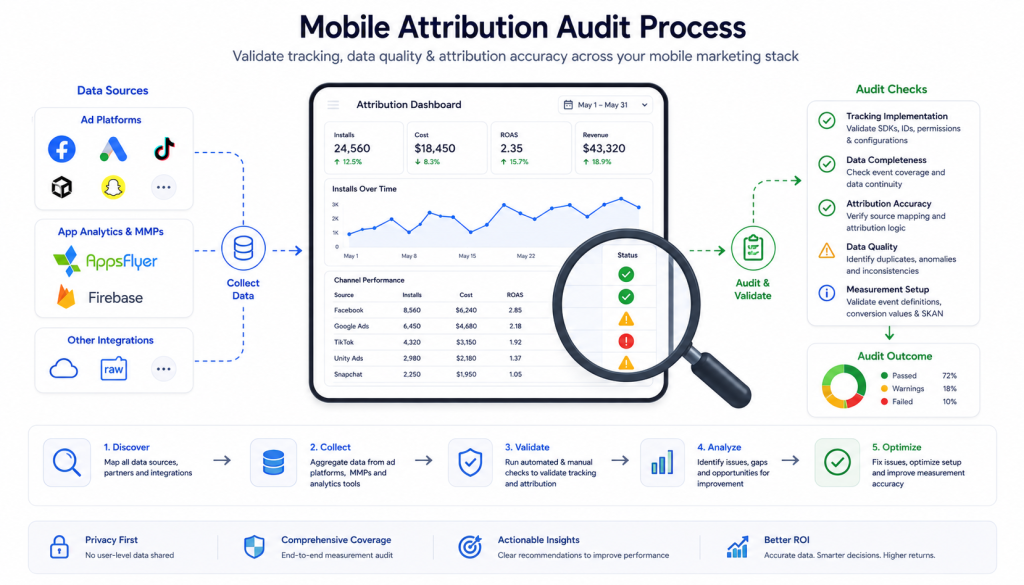
A mobile attribution audit is a systematic review of your entire app tracking setup — from SDK installation to MMP configuration to ad platform connections — to identify gaps, misconfigurations, and data discrepancies.
Think of it like a financial audit, but for your tracking data. You’re verifying that every install, event, and revenue data point is being captured accurately and attributed to the right source.
Why attribution audits matter:
- Ad spend decisions are based on attribution data — if the data is wrong, your budget allocation is wrong
- Broken attribution means you’re optimizing campaigns on bad signals
- Revenue discrepancies between MMP and app store can cost you thousands
- Privacy changes (ATT, SKAN) have broken attribution for many apps silently
7 Signs Your Mobile Attribution Is Broken
Before running a full audit, check for these warning signs:
1. MMP numbers don’t match ad platform numbers Your AppsFlyer dashboard shows 500 installs from Facebook, but Facebook Ads Manager shows 800. This discrepancy is normal to some extent, but large gaps signal a problem.
2. iOS installs dropped significantly after ATT If your iOS attribution dropped after Apple’s App Tracking Transparency update and never recovered, your SKAN setup is likely misconfigured.
3. High percentage of “organic” installs If 60-70% of your installs are showing as organic when you’re running paid campaigns, your MMP isn’t receiving attribution data from your ad networks.
4. Revenue events not appearing in MMP Purchase events firing in your app but not showing in your MMP dashboard — or showing as iapinvalid — means your revenue tracking is broken.
5. Duplicate events in your dashboard The same event firing 2-3 times per user action means your SDK is initialized multiple times or events are being sent from both client-side and server-side.
6. Last-click attribution showing impossible numbers CVR of 50%+ or install numbers that don’t match app store data are red flags for attribution fraud or misconfiguration.
7. Ad platform MMP mismatch Your Snapchat or TikTok campaign has the wrong MMP configured — meaning attribution data is being sent to AppsFlyer when you’re using Adjust, or vice versa.
Complete Mobile Attribution Audit Checklist
Run through this checklist systematically. Each section covers a different layer of your attribution stack.
Section 1 — SDK Integration Audit
iOS SDK:
- SDK version is current (check MMP release notes)
- SDK initialized in
AppDelegateorAppstruct — not in a view - ATT permission request implemented before SDK initialization
- Deep link handling configured correctly
- No duplicate SDK initialization across multiple files
Android SDK:
- SDK version is current
- SDK initialized in
Applicationclass — not inActivity - GAID (Google Advertising ID) access confirmed
- Install referrer library added
- No duplicate SDK initialization
Both platforms:
- Dev and production environments use separate API keys
- Debug mode disabled in production build
- SDK events visible in MMP real-time log
Section 2 — Event Tracking Audit
- All key events are defined and firing (install, registration, purchase, etc.)
- Event names match exactly between dev and production
- Revenue events include: amount, currency, transaction ID
- No
iapinvaliderrors in MMP dashboard - No duplicate events firing per user action
- Custom events use correct parameter names
- Events visible in MMP DebugView or real-time log
Key events every app should track:
| Event | Required Parameters |
|---|---|
| Install | Automatic |
| Registration | method |
| Login | method |
| Purchase | revenue, currency, transaction_id |
| Subscription Start | plan_type, revenue, currency |
| Level Complete (gaming) | level_number, score |
| Tutorial Complete | Automatic |
Section 3 — iOS Attribution Audit (ATT + SKAN)
This is the most critical section for iOS apps post-ATT.
- ATT permission prompt implemented
- ATT prompt fires at the right moment (not on first launch)
- SKAdNetwork IDs added to
Info.plistfor all active ad networks - SKAN conversion value schema defined and implemented
- Conversion value updates firing within the first 24 hours post-install
- MMP SKAN configuration matches your conversion value schema
- SKAN postbacks appearing in MMP dashboard
- Probabilistic attribution configured as fallback for ATT opt-outs
SKAN conversion value audit:
Check your MMP dashboard → SKAdNetwork section:
- Are postbacks being received?
- Are conversion values mapping to the correct events?
- Is the postback window (0-2 days, 3-7 days, 8-35 days) configured correctly?
Section 4 — Ad Platform Connection Audit
For each active ad platform, verify:
- MMP correctly set as measurement partner
- API connection active and pulling cost data
- Click-through attribution window matches your MMP settings
- View-through attribution window configured
- Deep link parameters passing correctly from ad to app
Common ad platform issues:
| Platform | Common Issue |
|---|---|
| Facebook/Meta | ATT opt-outs causing data gaps — enable AEM |
| TikTok | MMP not set or wrong MMP configured |
| Google Ads | Parallel tracking not enabled |
| Apple Search Ads | Attribution API not connected to MMP |
| Snapchat | Wrong MMP configured as measurement partner |
Section 5 — Revenue Attribution Audit
- In-app purchase events firing with correct revenue values
- Currency set correctly (USD, EUR, SAR, etc.)
- Transaction IDs unique per purchase
- No
iapinvaliderrors - Subscription events tracking renewal, cancellation, trial start
- Server-side purchase verification implemented (recommended for Android)
- Revenue in MMP matches revenue in app store (within acceptable margin)
Revenue discrepancy check:
Compare these numbers monthly:
- App Store Connect revenue
- Google Play Console revenue
- MMP reported revenue
- Your backend revenue
A 10-15% discrepancy is normal. Above 20% means you have a tracking problem.
Section 6 — Deep Link Audit
- Universal Links configured for iOS
- App Links configured for Android
- Deferred deep linking working on first install
- Deep link parameters passing correctly to app
- OneLink or custom deep link solution tested on both platforms
- Web-to-app attribution tracking correctly
Section 7 — Data Integrity Audit
- MMP install numbers vs App Store installs — within 15% margin
- Organic vs paid ratio is realistic for your spend levels
- No abnormal CVR spikes (possible fraud)
- Reattribution settings configured correctly
- Lookback window set appropriately (7-30 days for clicks, 1 day for views)
- Fraud protection enabled and configured
How to Fix the Most Common Attribution Issues
Fix 1 — iapinvalid Errors
Cause: Using deprecated revenue methods or incorrect parameters.
Fix:
// iOS — Wrong
tracker.trackRevenue(29.99, transactionId: "txn_123")

// iOS — Correct (AppsFlyer example)
let values: [String: Any] = [
    AFEventParamRevenue: 29.99,
    AFEventParamCurrency: "USD",
    AFEventParamOrderId: "txn_123"
]
AppsFlyerLib.shared().logEvent(AFEventPurchase, withValues: values)// Flutter/Singular — Wrong
Singular.logCustomRevenue("purchase", "USD", 29.99)
// Flutter/Singular — Correct
Singular.logEventWithArgs("purchase", {
"revenue": 29.99,
"currency": "USD",
"transaction_id": "txn_123"
})Fix 2 — High Organic Install Percentage
Cause: Ad network MMP not configured, or click attribution window too short.
Fix:
- Go to each ad platform → measurement settings → verify MMP is correctly set
- Check MMP → partner configuration → attribution window settings
- Extend click attribution window to 7 days for most networks
Fix 3 — iOS Attribution Drop After ATT
Cause: Missing SKAdNetwork IDs, wrong conversion value schema, or SKAN not configured.
Fix:
- Download latest SKAdNetwork IDs from your MMP
- Add all IDs to
Info.plist - Configure conversion value schema in MMP dashboard
- Implement conversion value update calls in your app
- Enable probabilistic attribution for ATT opt-outs
Fix 4 — MMP vs Ad Platform Number Discrepancy
Cause: Different attribution windows, view-through attribution counting, or time zone differences.
Fix:
- Align attribution windows between MMP and ad platform
- Check time zone settings — both should use same timezone
- Enable view-through attribution in MMP if ad platform counts it
- Wait 3-7 days for data to stabilize before comparing
Fix 5 — Duplicate Events
Cause: SDK initialized in multiple places, or both client-side and server-side firing.
Fix:
- Search codebase for multiple SDK initialization calls
- Ensure SDK only initialized in
Applicationclass (Android) orAppDelegate(iOS) - If using server-side tracking, disable client-side purchase events
- Add deduplication logic using transaction IDs
Tools You Need for a Mobile Attribution Audit
| Tool | Purpose |
|---|---|
| MMP DebugView | Real-time event verification |
| Charles Proxy | Intercept and inspect SDK calls |
| Android Debug Bridge (ADB) | Debug Android attribution |
| Xcode Instruments | Debug iOS attribution |
| Google Rich Results Test | Verify schema markup |
| MMP Export Logs | Raw attribution data export |
| Ad Platform Dashboards | Compare against MMP numbers |
When to Run a Mobile Attribution Audit
- Before scaling paid campaigns — ensure data is clean before spending more
- After a major SDK update — verify nothing broke
- After iOS updates — SKAN behavior changes with iOS versions
- When numbers don’t make sense — immediate audit needed
- Quarterly — regular health check for active apps
Do You Need a Professional Attribution Audit?
A DIY audit works for straightforward setups. But if you have:
- Multiple MMPs or are migrating between them
- Complex server-side tracking architecture
- Revenue discrepancies you can’t explain
- iOS attribution that collapsed after ATT
- Multiple ad platforms with conflicting data
A professional mobile attribution audit saves time and prevents costly mistakes.
Book a Free Attribution Audit →
FAQ
What is a mobile attribution audit? A mobile attribution audit is a systematic review of your entire app tracking setup — SDK integration, event tracking, MMP configuration, and ad platform connections — to identify and fix data gaps and discrepancies.
How long does a mobile attribution audit take? A basic self-audit takes 2-4 hours using a checklist. A professional audit typically takes 1-3 days depending on the complexity of your tracking stack.
How much does a mobile attribution audit cost? DIY audits are free but require technical knowledge. Professional audits typically range from $200-$1,500 depending on scope, number of platforms, and complexity.
What is the most common mobile attribution issue? The most common issues are incorrect SKAdNetwork setup on iOS after ATT, wrong MMP configured on ad platforms, and revenue events showing iapinvalid errors due to deprecated SDK methods.
How do I know if my iOS attribution is broken? Signs include a sudden drop in iOS attributed installs after ATT, high organic percentage, missing SKAN postbacks in your MMP dashboard, or conversion values not updating within the first 24 hours post-install.
Can I fix broken attribution without a developer? Some fixes — like configuring MMP settings or fixing ad platform connections — don’t require a developer. But SDK-level fixes like updating event methods or adding SKAdNetwork IDs require code changes.
How often should I audit my mobile attribution? Run a full audit quarterly, and a quick check after any major SDK update, iOS release, or when you notice data discrepancies.