SKAdNetwork Setup Guide for iOS Apps: Complete Implementation (2026)
Table of Contents
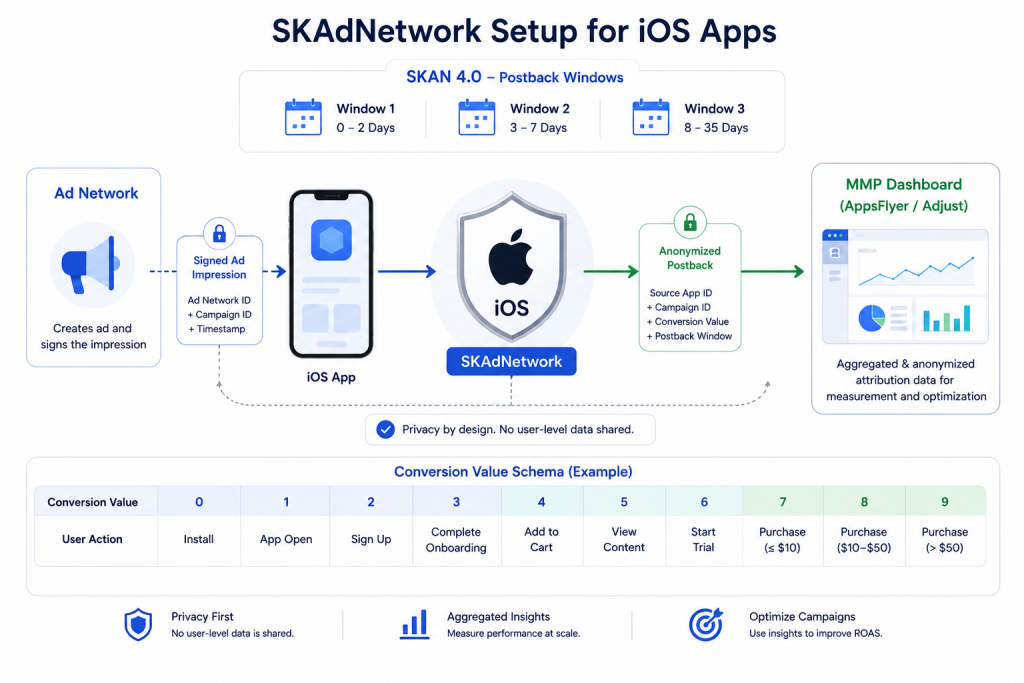
ToggleIf you run paid campaigns on iOS and your SKAdNetwork setup is incomplete, your attribution data will be thin and hard to trust. This SKAdNetwork setup guide walks through the full implementation: how the system works, what SKAN 4 changed, what really goes into your app, how to design conversion values and how to test the result.
The short answer: for users who decline App Tracking Transparency (ATT), SKAdNetwork is Apple’s built-in way to measure campaign results. I checked every technical claim here against Apple’s current documentation and the AppsFlyer and Adjust help pages in October 2026. Where a detail depends on your vendor, I say so.
What Is SKAdNetwork and Why Does It Matter?
SKAdNetwork (SKAN) is Apple’s privacy-preserving framework for measuring ad-driven app installs. Apple introduced it in iOS 11.3, and it became central once ATT arrived with iOS 14.5. It works without device-level identifiers. Instead of matching a user, iOS itself validates the install and sends a signed, aggregated postback to the ad network.
Apple describes three participants:
- Ad networks, which sign ads and receive postbacks.
- Source apps (or Safari web pages), which display the ads.
- Advertised apps, which update conversion values as people use them.
Your app is usually the advertised app. Knowing which role you play decides what you must configure, and that is where many older guides go wrong. For the wider picture, read what mobile attribution is and how it works, and if installs are already showing as unattributed, see how to fix broken iOS attribution after ATT.
How SKAdNetwork Works
The basic flow looks like this:
- A source app or Safari page shows an ad that the ad network has signed.
- The user taps the ad and installs the advertised app.
- When the user opens the app, it confirms the install by calling a conversion value method. Your MMP SDK normally does this for you.
- As the user engages, the app updates the conversion value.
- iOS sends a signed postback to the ad network, and to a URL you provide if you opt in to a copy.
Three points matter in practice. Postbacks come from iOS, not from your app or your MMP. They contain no user-level data. And they are delayed on purpose, so they never arrive in real time. Apple’s SKAdNetwork documentation is the reference for all of it.
SKAN 4 vs Earlier Versions
SKAN 4 arrived with iOS 16.1. Apple’s release notes list the main changes: multiple postbacks in three conversion windows, coarse conversion values, hierarchical source identifiers and attributed ads on the web.
| Feature | SKAN 3 | SKAN 4 |
|---|---|---|
| Postbacks per install | 1 | Up to 3 |
| Conversion values | Fine value, 0 to 63 | Fine value (first postback only) plus coarse values |
| Campaign data | Two-digit campaign ID | Source identifier, two to four digits depending on privacy tier |
| Window handling | Rolling 24 hour timer that restarts on each higher value | Fixed windows, with an optional lock |
| Safari web ads | No | Yes |
| Updating the value | Each update must be higher | Any valid value on each update |
The three SKAN 4 windows
Adjust’s explanation of SKAdNetwork 4 summarizes the windows and delays like this:
- Postback 1: days 0 to 2, sent 24 to 48 hours after the window. It can carry a fine value, a coarse value, or only the source identifier, depending on the privacy tier.
- Postback 2: days 3 to 7, sent 24 to 144 hours after the window, with a coarse value.
- Postback 3: days 8 to 35, sent 24 to 144 hours after the window, with a coarse value.
The lowest privacy tier (tier 0) does not receive the second and third postbacks at all. Apple assigns the tier per install based on crowd size, so low-volume campaigns get less detail. That is not a bug in your setup.
SKAdNetwork Setup Guide: 6 Implementation Steps
Follow these in order. Each step says what to do and what to check.
Step 1: Enable SKAdNetwork in Your MMP
Turn on SKAN in your MMP and use a current SDK. Menu paths change often, so look for the SKAdNetwork or SKAN section in your dashboard instead of following a fixed path from an old tutorial.
- Adjust: SKAdNetwork communication is on by default from iOS SDK v4.23.0, and the SDK registers at initialization. See Adjust’s SKAdNetwork iOS SDK guide.
- AppsFlyer: SKAN is configured in the dashboard, with Conversion Studio for conversion value mapping and a SKAN 4 mode for the three windows. Confirm the current options in your account.
Step 2: Configure Info.plist the Right Way
Most older guides tell you to paste a long list of ad network IDs into your app. Apple documents it differently. The SKAdNetworkItems list belongs to the source app, the app that displays ads. See Apple’s pages on configuring a source app and configuring an advertised app.
So the answer depends on your app:
- You only advertise your app: you do not need ad network IDs in Info.plist to receive install attribution. The MMP and the ad network handle the rest.
- You also show ads from networks (monetization): add the networks’ IDs, using each network’s current published list. Do not copy an ID list from an old article, because lists change.
What an advertised app can add is the postback copy endpoint, so your MMP receives a copy of the winning postback. Apple documents the NSAdvertisingAttributionReportEndpoint key for this. Adjust documents the value https://adjust-skadnetwork.com. AppsFlyer documents its own value, so copy it from your AppsFlyer account. Changing Info.plist requires a new app release.
Step 3: Design Your Conversion Value Schema
This is the most misunderstood part of SKAdNetwork setup. Your app reports what happened after the install through conversion values, and you define what each value means.
Rules that matter under SKAN 4, based on Apple’s documentation:
- The fine value (0 to 63) can only appear in the first postback, which covers the first two days.
- Later postbacks carry coarse values: low, medium or high.
- Apple allows any valid value on each update for SKAN 4 ads, so values do not have to keep rising. SKAN 3 ads required each update to be higher. Check how your MMP treats this.
- Apple’s privacy threshold decides whether the value appears at all. Low-volume campaigns often return null or coarse data.
Start with the early actions that best predict value in your business, then map them to values. Two examples to adapt, not copy:
| Value | Subscription app event |
|---|---|
| 0 | Install only |
| 1 | Completed onboarding |
| 2 | Viewed key feature |
| 3 | Started free trial |
| 4 | Purchase started |
| 5 | Purchased, lower value tier |
| 6 | Purchased, higher value tier |
| Value | Gaming app event |
|---|---|
| 0 | Install only |
| 1 | Tutorial completed |
| 2 | Early level reached |
| 3 | Deeper level reached |
| 4 | First purchase, small |
| 5 | First purchase, larger |
Also map your coarse values deliberately, for example low for install only, medium for engagement and high for a purchase. They are what you will see in the later windows.
Step 4: Implement the SDK Correctly
Your MMP SDK registers the install and updates conversion values for you once the schema is live. Check these points.
- Confirm the first launch call. Apple says to call a conversion update method as soon as the user first launches the app, which confirms the install. The SDK does this when SKAN handling is on.
- Handle the ATT order for the IDFA, not for SKAN. Apple states that SKAdNetwork calls do not require ATT authorization. The order only matters if you want the IDFA. With AppsFlyer,
waitForATTUserAuthorization(timeoutInterval:)makes the SDK wait for the user’s answer beforestart()sends data. - Use manual calls only when you manage values yourself. Adjust exposes the Apple methods, including
updatePostbackConversionValue(_:coarseValue:lockWindow:completionHandler:), for manual updates. - Use the window lock carefully. Setting
lockWindowto true tells iOS you are done in that window so the postback can go out sooner. Use it when a user has already reached your most valuable event, because a locked value cannot be updated again in that window.
Step 5: Plan Your Campaign Structure
SKAN 4 replaces the old campaign ID with a hierarchical four-digit source identifier. Winning postbacks contain two, three or four of those digits depending on the privacy tier, and the first two digits always arrive.
- Ask each network how it uses the source identifier. Networks define their own schemes, and your campaign structure has to match what they sign.
- Put your most important dimension in the first two digits. Those survive at every tier.
- Do not split volume too thin. Many tiny campaigns lower the chance that each one clears Apple’s privacy threshold, so you get less detail from each.
Step 6: Validate and Monitor
SKAN problems are often silent, so test on purpose.
- Use a physical device. Test the full install flow and confirm your events fire and conversion values update.
- Shorten the timers for testing. Apple supports testing ad attributions with a downloaded profile, which also lets you inspect postbacks through a proxy.
- Use your MMP’s tools. AppsFlyer provides SDK Integration Tests, and Adjust documents its testing tools.
- Monitor real postbacks. Watch total postbacks, postbacks by network and your null postback rate. A null postback means Apple’s privacy threshold or timing removed the value, so a high rate usually points to low campaign volume before it points to a bug.
- Compare with network reports. Some variance is normal, because networks and MMPs count differently. A large or growing gap deserves investigation.
Where AdAttributionKit Fits In
Apple’s current SKAdNetwork page now tells developers to use AdAttributionKit for app ad campaigns, and it documents how the two interoperate. AdAttributionKit arrived with iOS 17.4. You do not need to remove your SKAdNetwork setup today. Keep it working, then ask your MMP and your ad networks where their AdAttributionKit support stands. Apple’s ad attribution page is the best starting point.
Common SKAdNetwork Mistakes
- Adding network IDs to the wrong app. They belong in source apps that display ads, not in an app that only advertises itself.
- Copying a generic conversion value template. The schema must reflect the early actions that predict value for your own app.
- Treating SKAN 3 rules as current. Rising-only values, a rolling timer and one postback are SKAN 3 behavior. Check what your MMP is configured for.
- Splitting budget across too many campaigns. Small campaigns return less detail because they struggle to meet Apple’s privacy thresholds.
- Judging the setup before the delays pass. Postback delays are deliberate. Wait through the window plus the delay before you change anything.
Check Your Payloads Before You Debug Further
This SKAdNetwork setup guide covers the implementation, but debugging is where most time goes. Many SKAN problems first show up as a malformed payload or postback. Paste a test payload into the free mobile app attribution debugger and it will tell you which documented rule it breaks, with a link to the official page for that rule. It reads the payload only, so a clean result does not prove your setup works end to end. If you are still choosing a vendor, compare AppsFlyer vs Adjust, and for the SDK install steps use the AppsFlyer setup guide.
FAQ
What is the difference between SKAdNetwork and the IDFA?
The IDFA is a device identifier that supports user-level matching, and apps need the user’s ATT permission to read it. SKAdNetwork is Apple’s privacy-preserving system that reports campaign-level results through signed, aggregated postbacks. Apple states that apps do not need ATT authorization to call the SKAdNetwork APIs.
How many conversion values can I use?
A fine conversion value is a 6-bit number from 0 to 63. In SKAN 4, fine values can appear only in the first postback, and only when the install meets Apple’s privacy threshold. Otherwise you receive a coarse value of low, medium or high, or a null value.
Does SKAdNetwork work on Android?
No. SKAdNetwork is Apple’s framework and only applies to iOS. Google announced in October 2025 that it is retiring several Privacy Sandbox technologies, including the Attribution Reporting API, so do not plan Android measurement around them.
How long do SKAdNetwork postbacks take to arrive?
Apple sends a postback after a conversion window closes, or sooner if you lock the window, and adds a random delay. Adjust documents 24 to 48 hours for the first SKAN 4 postback and 24 to 144 hours for the second and third. Treat these as vendor-documented ranges and allow several days before you call a setup broken.
Can I use SKAdNetwork with both AppsFlyer and Adjust?
You should pick one MMP. Running two SDKs on the same app creates conflicting attribution data, adds SDK overhead and makes it hard to know which numbers to trust.
What happens if my app does not support SKAN 4?
Ads signed with SKAN 4 can only deliver multiple postbacks to advertised apps built with the iOS 16.1 SDK or later. Apple states that apps built with earlier SDKs can register only one conversion, so you lose the later windows and coarse values.
How do I know my SKAdNetwork setup is working?
Run a test install on a physical device with your MMP’s testing tools, confirm the SDK reports SKAN activity, and check that postbacks are arriving for real campaigns once the conversion windows and delays have passed. Zero postbacks long after installs started points to a setup problem.