Table of Contents
ToggleHow to Set Up Singular for Mobile Attribution (2026)
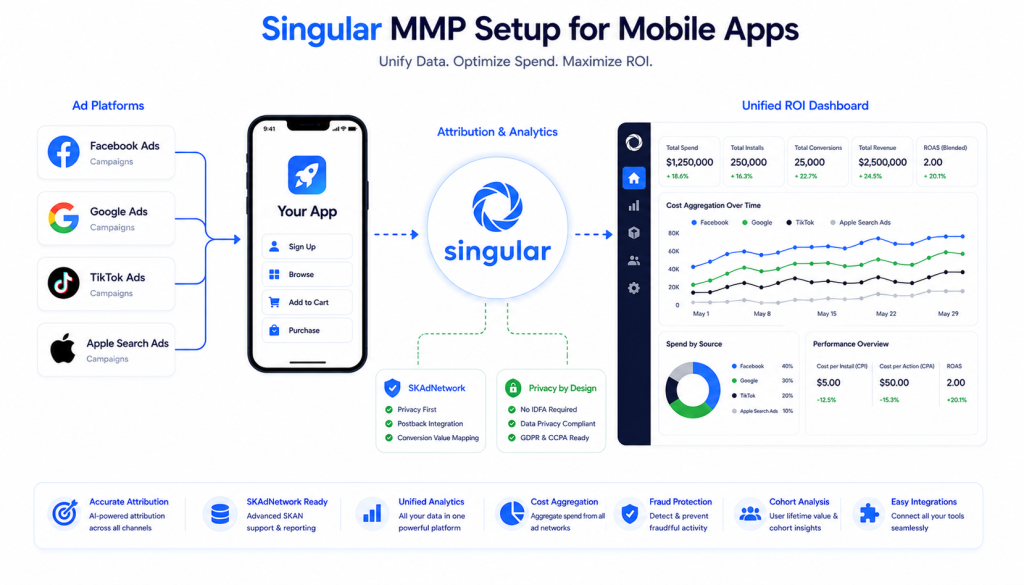
Singular setup for mobile attribution gives you a unified view of install attribution, ad spend, and revenue across every channel — combining MMP functionality with cost aggregation in one platform.
If you’re running paid campaigns across multiple ad networks and want a single source of truth for ROI, Singular is one of the strongest options available. But like any MMP, the setup needs to be done correctly or your attribution data will be unreliable.
This guide walks through the complete Singular setup process — from account creation to SDK integration, event tracking, SKAdNetwork configuration, and ad network connections.
In this guide:
- What Singular does and why mobile apps use it
- How to create and configure your Singular account
- iOS SDK setup with ATT and SKAdNetwork
- Android SDK setup with GAID
- Custom event tracking
- Server-side purchase tracking
- Ad network integrations
- How to validate your Singular setup
What Is Singular and Why Use It?
Singular is a Mobile Measurement Partner (MMP) that combines attribution with cost aggregation — giving you ROI data across every ad network in one dashboard.
Why teams choose Singular:
- Cost aggregation across 1,000+ ad networks built-in
- Strong creative-level reporting
- Unified ROI calculation without manual spreadsheet work
- Solid SKAdNetwork 4.0 support
- Fraud prevention included
Singular vs AppsFlyer vs Adjust:
| Feature | Singular | AppsFlyer | Adjust |
|---|---|---|---|
| Cost aggregation | Excellent — built-in | Good | Good |
| Ad network integrations | 1,000+ | 10,000+ | 2,000+ |
| Creative-level reporting | Strong | Good | Moderate |
| Fraud protection | Solid | Industry-leading | Solid |
| SKAN 4.0 support | Good | Advanced | Strong |
| Pricing | Mid-range | Higher | Competitive |
When to choose Singular:
- ROI and cost aggregation is your top priority
- You want creative-level performance insights
- You’re managing budget across many ad networks and want one unified ROAS view
Step 1 — Create Your Singular Account
- Go to singular.net
- Click “Get Started”
- Enter your company and app details
- Verify your email
- Log in to the Singular dashboard
Add your app:
- Dashboard → Apps → “Add App”
- Select platform (iOS or Android)
- Enter your Bundle ID or Package Name
- Click “Create App”
Important: Create separate Singular apps for iOS and Android — they use different SDK keys.
Step 2 — Get Your SDK Key
- Dashboard → Your App → SDK Integration
- Copy your SDK Key and SDK Secret
- You’ll need both for SDK initialization
Step 3 — iOS SDK Setup
Install Singular iOS SDK
CocoaPods:
pod 'Singular-SDK'Swift Package Manager:
- Xcode → File → Add Packages
- Enter:
https://github.com/singular-labs/ios_sdk
Configure ATT Permission
Add to Info.plist:
<key>NSUserTrackingUsageDescription</key>
<string>This helps us measure ad performance and improve your experience.</string>
Initialize Singular iOS SDK
import Singular
import AppTrackingTransparency

@main
struct MyApp: App {
    init() {
        let config = SingularConfig(apiKey: "YOUR_SDK_KEY", andSecret: "YOUR_SDK_SECRET")
        Singular.start(config)
    }

    var body: some Scene {
        WindowGroup {
            ContentView()
                .onAppear {
                    if #available(iOS 14, *) {
                        ATTrackingManager.requestTrackingAuthorization { status in
                            // Singular automatically picks up IDFA after permission
                        }
                    }
                }
        }
    }
}
Add SKAdNetwork IDs
Download the latest SKAdNetwork IDs from Singular and add to Info.plist:
<key>SKAdNetworkItems</key>
<array>
    <dict>
        <key>SKAdNetworkIdentifier</key>
        <string>cstr6suwn9.skadnetwork</string>
    </dict>
    <!-- Add all Singular provided IDs -->
</array>
Step 4 — Android SDK Setup
Add Singular to build.gradle
App-level:
dependencies {
    implementation 'com.singular.sdk:singular_sdk:11.+'
}
Add Permissions to AndroidManifest.xml
<uses-permission android:name="android.permission.INTERNET" />
<uses-permission android:name="android.permission.ACCESS_NETWORK_STATE" />
<uses-permission android:name="com.google.android.gms.permission.AD_ID" />
Initialize Singular Android SDK
import com.singular.sdk.Singular
import com.singular.sdk.SingularConfig

class MyApplication : Application() {
    override fun onCreate() {
        super.onCreate()

        val config = SingularConfig("YOUR_SDK_KEY", "YOUR_SDK_SECRET")
        Singular.init(this, config)
    }
}
Important: Initialize in Application class, not in Activity.
Step 5 — Track Custom Events
iOS (Swift):
// Registration
Singular.event("registration", withArgs: ["method": "email"])

// Purchase
Singular.eventOrderId(
    "purchase",
    withArgs: [
        "revenue": 29.99,
        "currency": "USD",
        "product_id": "premium_plan"
    ],
    revenue: 29.99,
    currency: "USD",
    orderId: "order_12345"
)
Android (Kotlin):
// Registration
val registrationArgs = JSONObject()
registrationArgs.put("method", "email")
Singular.event("registration", registrationArgs)

// Purchase
val purchaseArgs = JSONObject()
purchaseArgs.put("revenue", 29.99)
purchaseArgs.put("currency", "USD")
Singular.eventWithRevenue("purchase", "USD", 29.99, purchaseArgs)
Recommended events to track:
| Event | Purpose | Key Parameters |
|---|---|---|
| Registration | User sign up | method |
| Login | User login | method |
| Purchase | Revenue event | revenue, currency, order_id |
| Trial Start | Free trial begins | plan_type |
| Subscription Start | Subscription begins | plan_type, revenue |
| Tutorial Complete | Onboarding done | — |
Step 6 — Server-Side Purchase Tracking (Recommended for Android)
For reliable revenue attribution, especially on Android, server-side tracking is strongly recommended.
Why server-side tracking matters:
- Bypasses client-side limitations
- Provides device-level GAID attribution
- Verifies purchases server-side before counting revenue
Typical implementation (Firebase Cloud Function example):
const functions = require('firebase-functions');
const axios = require('axios');

exports.singularPurchaseS2S = functions.firestore
    .document('purchases/{purchaseId}')
    .onCreate(async (snap, context) => {
        const purchase = snap.data();

        await axios.post('https://api.singular.net/api/v1/event', {
            sdk_key: 'YOUR_SDK_KEY',
            sdk_secret: 'YOUR_SDK_SECRET',
            event_name: 'purchase',
            device_id: purchase.gaid,
            revenue: purchase.amount,
            currency: purchase.currency,
            order_id: purchase.transactionId
        });
    });
This pattern sends purchase events directly from your server to Singular’s API, using the device’s GAID for accurate device-level attribution — eliminating client-side tracking gaps.
Step 7 — Configure SKAdNetwork (iOS)
- Dashboard → Your iOS App → SKAdNetwork
- Click “Conversion Value Mapping”
- Map conversion values to your key events:
| CV | Event | Revenue Range |
|---|---|---|
| 0 | Install only | — |
| 1 | Registration | — |
| 2 | Trial start | — |
| 3 | Purchase | $0-$10 |
| 4 | Purchase | $10-$50 |
| 5 | Purchase | $50+ |
- Singular automatically manages postback windows and conversion value updates based on your schema configuration.
Step 8 — Connect Ad Networks
For each active ad network, configure the integration in Singular:
- Dashboard → Data Integrations → Data Connectors
- Click “Add Data Connector”
- Search for your ad network (Facebook, Google, TikTok, Apple Search Ads, Snapchat, etc.)
- Enter API credentials
- Click “Connect”
Common ad networks to connect:
- Facebook Ads
- Google Ads (AdWords)
- TikTok Ads
- Apple Search Ads
- Snapchat Ads
Important: Always verify the correct MMP is set as the measurement partner on each ad platform. A common mistake is having a different MMP configured on an ad network than the one you’re actually using — this causes complete attribution loss for that channel.
Step 9 — Validate Your Singular Setup
Method 1 — Singular Real-Time Dashboard:
- Dashboard → My Dashboards
- Check “Installs over Time” and “Impressions over Time” widgets
- Trigger test events on your device
Method 2 — Export Logs:
- Dashboard → Reports & Insights → Export Logs
- Filter by Type: Clicks, Conversions, Events, Postbacks, SKAN Postbacks
- Enable “Use Real-time data”
- Verify data is flowing correctly
Method 3 — Data Connectors Status:
- Dashboard → Data Integrations → Data Connectors
- Verify all connected networks show “Active” status
Validation Checklist:
- Install event fires on fresh install
- Custom events appear in dashboard
- Revenue events show correct amount and currency
- SKAN postbacks appearing (iOS)
- All ad network connectors showing “Active”
- No
iapinvalidor similar revenue errors
Singular Setup for Flutter Apps
If you’re using Flutter, use the official Singular Flutter plugin:
# pubspec.yaml
dependencies:
singular_flutter_sdk: ^1.13.0import 'package:singular_flutter_sdk/singular_flutter_sdk.dart';
SingularConfig config = SingularConfig("YOUR_SDK_KEY", "YOUR_SDK_SECRET");
Singular.start(config);
// Track event
Singular.eventWithArgs("purchase", {
"revenue": 29.99,
"currency": "USD",
"product_id": "premium_plan"
});This is the exact stack used in our Singular mobile attribution case study for a Flutter-based e-commerce app — covering SDK setup, server-side purchase tracking, and 5 ad platform connections.
Common Singular Setup Mistakes
Mistake 1 — Using Deprecated Revenue Methods
Older Singular SDK methods like logCustomRevenue() are deprecated and cause iapinvalid errors. Always use eventWithArgs() or eventOrderId() with proper parameters.
Mistake 2 — Wrong MMP Configured on Ad Networks
A common and costly mistake is having a different MMP set as the measurement partner on an ad network (e.g., Snapchat configured with AppsFlyer when you’re actually using Singular). Always verify each ad platform’s MMP setting matches your actual MMP.
Mistake 3 — No Server-Side Tracking for Android
Relying only on client-side tracking for Android purchases leaves revenue data unverified. Server-side tracking with GAID attribution closes this gap.
Mistake 4 — Missing SKAdNetwork IDs
If your Info.plist doesn’t include Singular’s SKAdNetwork IDs, iOS campaigns running on those networks cannot be attributed via SKAN.
Mistake 5 — Not Setting Device ID for Server-Side Events
Server-to-server events require the device GAID (Android) to be correctly attributed. Missing this parameter results in unattributed revenue.
FAQ
What is Singular used for in mobile attribution?
Singular is a Mobile Measurement Partner that tracks install attribution and combines it with cost aggregation across ad networks, giving teams a unified ROI view without manual spreadsheet work.
Is Singular better than AppsFlyer?
Neither is universally better. Singular has stronger built-in cost aggregation and creative-level reporting. AppsFlyer has more ad network integrations and more advanced fraud protection. The right choice depends on whether ROI aggregation or integration breadth matters more to you.
Does Singular support Flutter apps?
Yes. Singular has an official Flutter plugin supporting both iOS and Android with the same core API as the native SDKs.
How do I fix iapinvalid errors in Singular?
iapinvalid errors happen when deprecated SDK methods like logCustomRevenue() are used. Replace them with eventWithArgs() or eventOrderId() with proper revenue parameters.
Does Singular support SKAdNetwork 4.0?
Yes. Singular supports SKAN 4.0 including conversion value mapping and postback configuration for iOS 14+ privacy-compliant attribution.
How do I track purchases in Singular?
Use the eventOrderId() or eventWithArgs() methods with revenue, currency, and order_id parameters. For Android, server-side tracking with GAID attribution is recommended for accuracy.
Can Singular replace Firebase Analytics?
No. Singular handles install attribution and ad network cost aggregation. Firebase Analytics tracks in-app behavior. They complement each other in a complete mobile measurement stack.