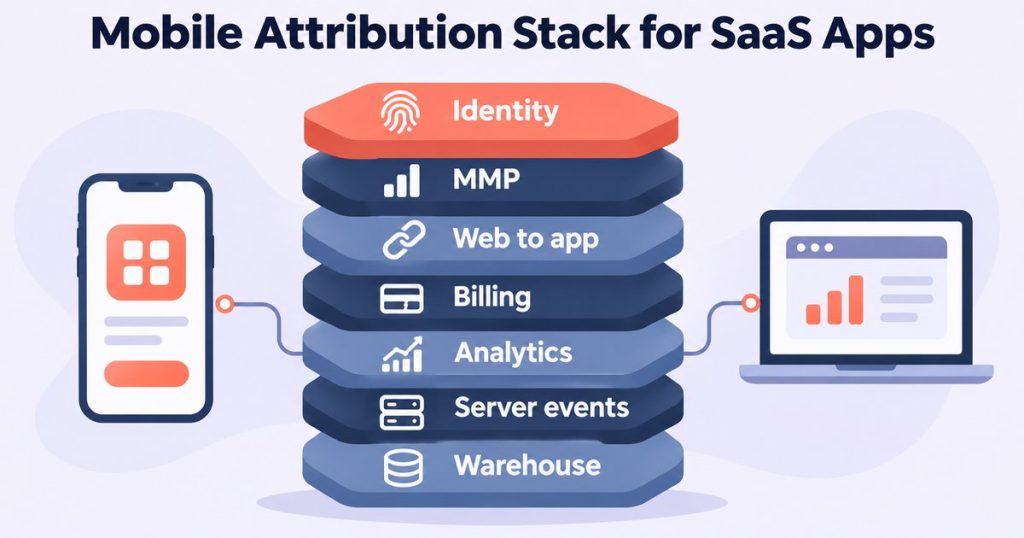
Mobile Attribution Stack for SaaS Apps: 7 Easy Layers
Table of Contents
ToggleA mobile attribution stack for a SaaS app is not the same thing as the stack for a mobile game. SaaS users often start on the web, sign up on a laptop, pay through a subscription that renews while the app is closed, and open the mobile app a week later. Install attribution alone cannot follow that path. This complete mobile analytics stack guide for 2026 builds the mobile attribution stack in seven layers and shows where each tool fits.
Every tool behavior below comes from the vendor’s own documentation for AppsFlyer, RevenueCat, Mixpanel, Amplitude, PostHog and Google, checked on 2 November 2026. Where a page does not say something, I say that instead of guessing. The staging advice at the end is my own recommendation and is labelled that way.
Mobile Attribution Stack for SaaS Apps at a Glance
- Layer 1, identity and consent. One user ID that every tool shares, and a consent state that every tool respects.
- Layer 2, the MMP. Answers where an install came from.
- Layer 3, the web-to-app bridge. Carries the campaign from the web visit into the app install.
- Layer 4, subscription revenue. Sends trials, renewals and refunds from the billing source, not from the phone.
- Layer 5, product analytics. Answers what users do after they arrive.
- Layer 6, server-side events. Your backend fills the gaps the SDKs cannot see.
- Layer 7, warehouse and raw data. Keeps the unsampled record outside any single dashboard.
What a Mobile Attribution Stack Needs for a SaaS App
Three questions drive the design. Where did this user come from, what do they do in the product, and what do they pay. Attribution answers the first, analytics answers the second, and billing answers the third. A mobile attribution stack that connects all three through one user ID can answer which campaign brings subscribers who stay, not just installs. If the basics are new to you, read what mobile attribution is first.
SaaS adds three needs on top of installs: a bridge from the web visit to the app, a stable ID that survives login on several devices, and subscription revenue that arrives from the billing system. The seven layers below cover each of them.
Layer 1: Identity and Consent for Your Mobile Attribution Stack
Identity is the layer most stacks skip and later regret. Every tool in the stack invents its own ID: the MMP has one, the analytics tool has one, the billing tool has one, and Firebase has an app instance ID. Decide early which ID is canonical, almost always your own database user ID, and map the others to it on your backend.
{
  "user_id": "user_48213",
  "appsflyer_id": "1700000000000-1234567890123456789",
  "revenuecat_app_user_id": "user_48213",
  "analytics_distinct_id": "user_48213",
  "app_instance_id": "FIREBASE_APP_INSTANCE_ID",
  "consent": {
    "analytics": "granted",
    "ads": "denied",
    "att_status": "denied"
  }
}
Consent belongs in the same record. Firebase tracks four consent types: analytics storage, ad storage, ad user data and ad personalization. A consent platform guide for Android from Cookie Information advises setting data collection off by default, because a new user has not chosen yet, and updating Firebase after the user answers. On iOS, record the App Tracking Transparency answer too. The server-side tracking for mobile apps guide shows how to pass these signals on every server event.
Layer 2: The MMP That Answers Where Users Come From
The mobile measurement partner (MMP) attributes installs and events to the ad or link that caused them, reports SKAdNetwork data, filters fraud and aggregates cost. This is the layer most people mean by a mobile attribution stack. Choosing between vendors is a separate decision, covered in Branch vs AppsFlyer, Singular vs AppsFlyer and AppsFlyer vs Adjust.
Do you need one yet? If you run no paid acquisition and only want to know how many installs come from your own web pages, you may not. AppsFlyer’s pricing page describes its free Zero plan as aimed at owned media and not suitable for apps with paid activities. Once you buy ads across several networks, you need one independent source of attribution, and that is what an MMP provides. Set the SDK up carefully with the AppsFlyer setup guide, and read the SKAdNetwork setup guide before you plan iOS campaigns.
Layer 3: The Web-to-App Bridge
For SaaS, this is where attribution quietly breaks. AppsFlyer’s web-to-app guide explains why: a visitor clicks an ad, lands on your web page, then clicks again to the app store. Those two clicks make attribution and deep linking hard, and installs can be misattributed as organic even when an ad started the visit.
- Smart Banners. You add a web SDK to your site and build banners in the dashboard. The banner URL is built from the incoming parameters or UTMs. They support all media sources, including organic, but not desktop users.
- OneLink Smart Script. A script on your mobile site builds the outgoing button URLs from the incoming URL. It supports desktop users and all media sources, and developers implement it.
- Plan requirement. AppsFlyer states both require an eligible paid plan.
The guide does not say explicitly whether web campaign parameters carry into the app after install, so test that with a real install before you rely on it. PostHog documents its own bridge for identity: if a user moves from web to mobile before signing in, pass the web distinct_id in the deep link, for example in a ph_distinct_id query parameter. Branch is the other common route for link-based flows, see the Branch deep links setup guide.
Layer 4: Subscription Revenue From the Billing Source
For a SaaS app, revenue is a subscription lifecycle, and most of it happens without the app open. A trial converts overnight, a renewal lands on the 1st, a card fails. If those events depend on the phone, you will miss many of them. A billing layer such as RevenueCat sends them from its servers instead.
RevenueCat to AppsFlyer
RevenueCat’s AppsFlyer integration sends events from RevenueCat’s servers, including trial conversions and renewals, without the app being open. Revenue events are sent for all revenue actions, and negative revenue is supported. Four points matter when you set it up:
- AppsFlyer ID. Call
setAppsflyerIDwith the AppsFlyer UID. The page warns that if the ID is missing, some events may not be delivered. - Device identifiers. Call
collectDeviceIdentifiers(). On iOS it collects the IDFA, IDFV and IP, and after a user grants ATT you call it again to update the IDFA. - No double counting. Remove any client-side purchase tracking in AppsFlyer, since the page warns it can double count.
- Web purchases. Web store purchases go through a Web S2S API, which supports Stripe, RevenueCat Billing and Paddle, or a Web PBA API for Stripe only. RevenueCat says PBA is being retired by the end of 2026.
RevenueCat to Mixpanel
RevenueCat’s Mixpanel integration sends subscription events such as rc_trial_started_event, rc_trial_converted_event, rc_renewal_event, rc_cancellation_event and rc_billing_issue_event. Each also adds a transaction record to the user’s Mixpanel profile, and RevenueCat updates a rc_subscription_status attribute. The recommended identity setup is to set the Mixpanel distinct ID to the RevenueCat App User ID with identify(), so SDK events and billing events resolve to the same person. RevenueCat’s page does not address duplicate events, so decide which source owns each event before you switch it on.
Layer 5: Product Analytics in a Mobile Analytics Stack
Product analytics shows what users do after install. Mixpanel, Amplitude and PostHog all work on mobile, and all three follow the same pattern: an anonymous ID first, then a known user ID after login. The differences are in how they merge identities.
- Mixpanel. The SDK generates a
$device_id. You callidentify(user_id)at signup or login, and merging is retroactive. Mixpanel says two user IDs cannot be merged and a user ID cannot be changed. Callreset()on logout, and expect full propagation to take up to 24 hours. See Mixpanel’s identity guide. - Amplitude. It tracks a device ID, a user ID and an Amplitude ID, and prioritises user IDs over device IDs. Amplitude’s unique users guide warns that projects in one organization must use the same user ID variable, or one person may be counted as several users under MTU billing. A reinstall usually creates a new device ID, which can trigger a merge.
- PostHog. Call
identifyas soon as possible, on first app load and after login, and callreset()on logout. PostHog rejects generic values such as guest or null, because they merge different users. Its identify guide notes that identified events can cost up to four times more to process than anonymous ones.
Pick one tool as the primary analytics home and feed the others only if you must. Running two in parallel doubles the identity work.
Connecting the MMP to Mixpanel
AppsFlyer’s Mixpanel integration sends installs, organic and non-organic, with the media source and campaign name. For apps with a login system, the documented path is to read Mixpanel’s generated distinct ID, set it as the AppsFlyer customer user ID, and call identify() at login so the two link. The page says Mixpanel captures its own in-app events through its SDK, so the only extra event AppsFlyer sends is af_uninstall. It also says attribution links, cost data and ad revenue are not supported in this integration.
Firebase and GA4
Many SaaS apps also run Firebase Analytics for Google Ads audiences. Its identifier is the app_instance_id, which your server needs if it sends events through the Measurement Protocol. The server-side tracking guide covers that call and its limits.
Layer 6: Server-Side Events in a Mobile Attribution Stack
Layer 4 handles subscription events through a managed billing tool. Layer 6 covers everything else your backend knows: a refund from a manual process, a CRM stage, a seat added by an admin who never opened the app. The rule is simple. Events your backend confirms go through the server, events about the device stay in the SDK, and each event name has exactly one source. The full steps, payloads and limits for AppsFlyer, Adjust, Branch, Meta and GA4 are in the server-side tracking for mobile apps guide.
Layer 7: Warehouse and Raw Data
Dashboards sample, aggregate and change definitions. A warehouse copy keeps the record you can query later. A mobile attribution stack has two common sources.
- GA4 and Firebase to BigQuery. Google’s BigQuery export page lists a daily export of the previous day’s raw events, which typically arrives mid-afternoon, and a streaming export that is near real time but best effort with no completeness guarantee. Standard properties have a daily export limit of 1 million events. Streaming adds $0.05 per gigabyte. Streaming excludes traffic source fields for new users, so use the daily export for attribution analysis.
- AppsFlyer Data Locker. AppsFlyer’s Data Locker is a premium feature that sends report data to cloud storage. Destinations include AWS S3, Google Cloud Storage, Azure Blob, BigQuery and Snowflake. Hourly reports arrive with a delay of about one to three hours, all times are in UTC, and historical data is not supported. AppsFlyer-owned storage deletes data after 14 days, so retention in your own storage is your job.
Join both on your canonical user ID from Layer 1. Without it, the warehouse becomes a pile of tables that cannot be matched.
Which Mobile Analytics Stack to Build First in 2026
This staging is my own recommendation, not a vendor claim. Adjust it to your budget and team size.
- Before launch or with no ad spend. Layer 1, a billing layer from Layer 4, and one product analytics tool from Layer 5. Add Firebase if you plan Google Ads.
- When you start paid acquisition. Add the MMP from Layer 2, then the web-to-app bridge from Layer 3. Test the bridge with real installs before you spend.
- When numbers disagree between tools. Add server-side events from Layer 6 and the warehouse from Layer 7, then reconcile on the canonical user ID.
Before you add any layer, fire one test event end to end and check it in the free mobile app attribution debugger. The mobile attribution audit guide has a checklist for reviewing a stack that is already live.
Common Mistakes in a Mobile Attribution Stack
- Using a different user ID in each tool, so the same person appears several times.
- Tracking purchases in the SDK and in the billing tool at once.
- Skipping
reset()on logout, so two people on one device merge into one profile. - Calling
identifywith generic values such as guest or null. - Sending web visitors to the app store without carrying the campaign parameters.
- Running two product analytics tools without deciding which one is the source of truth.
- Treating the AppsFlyer-owned Data Locker bucket as a long-term archive.
- Leaving consent out of the identity record.
FAQ
What is a mobile attribution stack?
A mobile attribution stack is the set of tools that tells you where users come from, what they do and what they pay. For a SaaS app it usually combines an identity plan, an MMP, a web-to-app bridge, a billing tool, product analytics, server-side events and a warehouse.
How is a mobile attribution stack for SaaS apps different from one for games?
SaaS users often start on the web, sign in on several devices and pay through subscriptions that renew while the app is closed. That adds a web-to-app bridge, a shared user ID and subscription revenue sent from the billing source.
Do I need an MMP if I only run organic traffic?
Not always. AppsFlyer describes its free Zero plan as aimed at owned media and not suitable for apps with paid activities. Once you buy ads across several networks, you need one independent source of attribution, and that is what an MMP provides.
Which product analytics tool works best on mobile?
The documentation does not support naming a winner. Mixpanel, Amplitude and PostHog all use an anonymous ID first and a known user ID after login. Choose by how you want identity merging, billing and queries to work, and pick one as the primary home.
How do I connect RevenueCat to AppsFlyer and Mixpanel?
For AppsFlyer, set the AppsFlyer ID and device identifiers in the RevenueCat SDK, then remove client-side purchase tracking to avoid double counting. For Mixpanel, set the Mixpanel distinct ID to the RevenueCat App User ID with identify, so both sources resolve to one person.
Do I need a data warehouse in my mobile analytics stack?
Not on day one. Add it when dashboards disagree or you need unsampled history. GA4 can export to BigQuery, and AppsFlyer Data Locker, a premium feature, can send report data to cloud storage.
Can server-side events replace the SDKs?
No. SDKs still record installs, sessions and ad click matching, and server events depend on identifiers the SDKs capture. Use the server for events your backend confirms, such as renewals and refunds.
If you want a second pair of eyes on your mobile attribution stack, send a short description to contact@alfahadhridoy.com and I will reply by email with what to check.