Server-Side Tracking for Mobile Apps: 7 Easy Setup Steps
Table of Contents
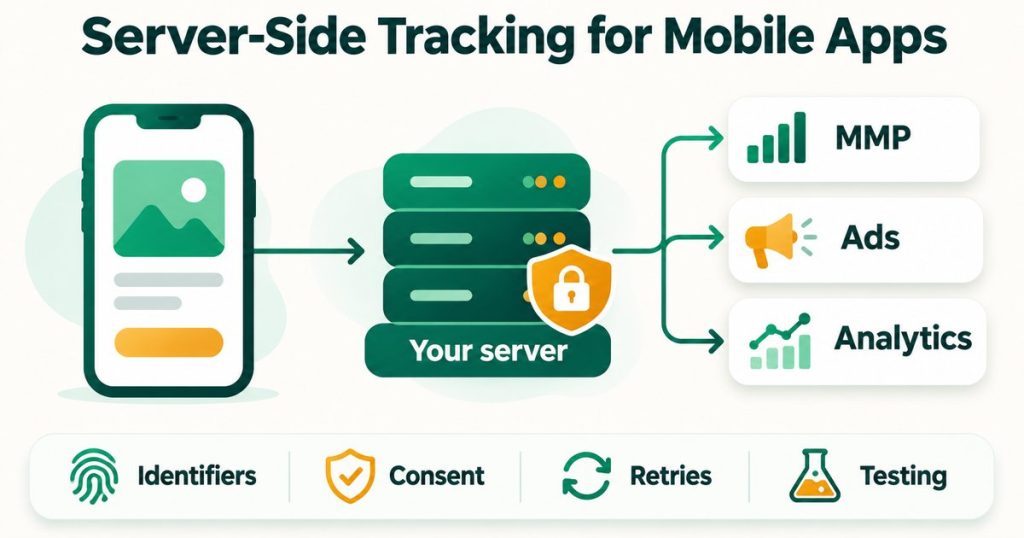
ToggleServer-side tracking for mobile apps is often explained by copying the web version, and that is where the confusion starts. On the web you move browser tags into a server container. In an app there is no browser tag to move, because the SDK already runs on the device. So server-side tracking for mobile apps means something narrower: your own backend sends selected events to your measurement partner (MMP), to Meta or to Google Analytics, instead of the phone doing it.
This guide works from official documentation for AppsFlyer, Adjust, Branch, Meta’s Conversions API and Google’s Measurement Protocol, all checked on 2 November 2026. Where a vendor page leaves something out, I say so instead of guessing. The setup takes seven steps, and each one lists the exact fields and limits that tend to break it.
Server-Side Tracking for Mobile Apps at a Glance
- Keep the SDK. It still records installs, sessions and ad click matches. Your server adds events the phone cannot report cleanly.
- Store identifiers early. Every platform needs a device or install identifier to match a server event to the right install.
- One source per event. Sending the same purchase from the SDK and from the server is the most common way to double count.
- Every API has its own rules. Time windows, one event per request, IPv4 only and key handling all differ by platform.
- Consent still applies. Moving an event to your server does not remove the need for the user’s permission.
What Server-Side Tracking Means for a Mobile App
In a normal setup the MMP SDK reports installs, sessions and in-app events from the phone. A server-side setup adds a second path. When your backend learns something the phone may not report cleanly, it posts an event to the platform’s API. Typical cases are a payment your server confirmed, a subscription renewal that happens while the app is closed, a refund, or a lead that your sales team marks as qualified in a CRM.
The platform still has to know which device and which ad click the event belongs to, and that match depends on identifiers captured on the device earlier. If attribution basics are new to you, start with what mobile attribution is.
Adjust’s S2S events page states the split plainly: use the Adjust SDK to record installs, sessions and reattributions, and send only custom events through S2S. Treat that as a sound default for every platform, not only Adjust.
Why Server-Side Tracking for Mobile Apps Is Worth the Effort
- Your backend is the record of money. A payment your server has confirmed is a firmer fact than a screen the user happened to reach.
- Some events happen with the app closed. Renewals, refunds and trial conversions are known to your billing system first.
- One definition per event. When one service decides what counts as a purchase, the MMP, Meta and GA4 all receive the same answer.
- Offline stages can join the picture. CRM milestones can be sent as events, which the app itself never sees.
The cost is real, though. You now own identifier storage, retries, deduplication and consent handling. If your only goal is install attribution, this setup is not needed.
Step 1: Decide Which Events Go to the Server
Use a simple rule for server-side tracking for mobile apps. Events your backend confirms go through the server. Events that describe what happened on the device stay in the SDK.
- Server: confirmed purchases, subscription renewals, refunds, trial conversions, CRM stages.
- SDK: installs, app opens, sessions, ad click matching, screen and button events.
Pick one source for each event name and write it down. Meta documents deduplication using event_id together with event_name. The AppsFlyer, Adjust and Branch pages I read do not describe an equivalent rule for S2S events, so for those platforms a second source is a duplicate, not a backup.
Step 2: Store Identifiers on Your Backend at Install
Server-side tracking for mobile apps works only when each event carries the right identifier. Capture these in the app once, right after first launch, and save them against your own user ID.
- AppsFlyer:
appsflyer_id, generated at first install and available in the SDK. AppsFlyer lists it as mandatory, in the format 13 digits, a hyphen, then 19 digits. Also set the customer user ID in the app at install so raw data reports can map it to the device. - Adjust: an advertising ID (
idfaon iOS,gps_adidon Android) is required, andadidis recommended on iOS so devices can still be matched when the IDFA is unavailable. - Branch: at least one of
developer_identity,browser_fingerprint_id, or an iOS or Android device ID such asidfa,idfv,aaidorandroid_id. - Meta: the install ID as
anon_idand the advertising ID asmadid. - GA4:
app_instance_id, which Google says must come from the Firebase SDK, for example fromFirebaseAnalytics.getAppInstanceId().
A minimal record per user looks like this. Store the advertising ID only when the user allowed it.
{
  "user_id": "user_48213",
  "appsflyer_id": "1700000000000-1234567890123456789",
  "app_instance_id": "FIREBASE_APP_INSTANCE_ID",
  "meta_anon_id": "META_INSTALL_ID",
  "att_status": "authorized",
  "idfa": "ONLY_IF_ATT_AUTHORIZED"
}
If you send an AppsFlyer event with no device identifier, AppsFlyer tries to enrich it from the install, except for IDFV. AppsFlyer also warns that missing identifiers can cause postback issues, audience rule failures and exclusion from incrementality measurement. Do not rely on the fallback.
Step 3: Send Events to Your MMP
AppsFlyer S2S Events API
AppsFlyer’s S2S in-app events reference uses a POST to https://api3.appsflyer.com/inappevent/{app_id}. The key must be the app’s S2S key, and an admin generates it. Send it in the authentication header described on that reference page.
{
  "appsflyer_id": "1700000000000-1234567890123456789",
  "eventName": "af_purchase",
  "eventValue": "{\"af_revenue\":\"9.99\"}",
  "eventCurrency": "USD",
  "eventTime": "2026-11-02 09:30:00.000",
  "customer_user_id": "user_48213",
  "ip": "203.0.113.10",
  "os": "17.5"
}
These are the details that matter in practice when you wire up server-side tracking for mobile apps with AppsFlyer:
- iOS app ID needs the prefix. Use
id123456789. Without theid, the request returns 200 and the event is not recorded. - One event per request. Batches are not supported, the JSON payload is limited to 1 KB, and TLS 1.2 or higher is required.
- eventValue is a string. It must be stringified JSON, and an empty string if there is no value. Revenue is a plain number with no currency sign and no comma separators, and negative values are allowed for cancellations.
- IPv4 only. The
ipfield accepts IPv4, and it feeds geo fields. - iOS 14.5 and later. AppsFlyer says to use the
attparameter for those devices, and a missingoson iOS is treated as 14.5. - Time handling. AppsFlyer keeps your
eventTimeonly inside a short window around the event day, with a cutoff at 02:00 UTC, and otherwise stamps the event with its arrival time. A late retry can therefore be recorded at the wrong time. - Wait after install. Events sent right after an install can be recorded as organic if they arrive before install processing finishes, which AppsFlyer puts at 20 to 30 seconds or more.
- Response codes. A 200 means only minimal validation passed. A 401 means the key is not the app’s S2S key, and a 400 covers failed authentication, a missing
appsflyer_id, an unparseable payload, or anapp_idthat does not match the token.
If you are still on the older endpoint, AppsFlyer’s upgrade bulletin says the api2 URL moves to api3 with a new S2S key, and that the old endpoint will be blocked for affected apps after migration. For the SDK side, see the AppsFlyer setup guide. If you hit a 401, the AppsFlyer S2S 401 debug guide walks through the causes.
Adjust S2S Events API
Adjust’s S2S events documentation accepts requests at https://s2s.adjust.com/event, by GET or POST. Each request carries a token generated in the Adjust dashboard when S2S security is on, and the examples send it in an Authorization: Bearer header. Test the token before you activate S2S authentication, because requests with a missing or wrong token are rejected.
curl -X POST "https://s2s.adjust.com/event" \
  -H "Authorization: Bearer $ADJUST_S2S_TOKEN" \
  -H "Content-Type: application/x-www-form-urlencoded" \
  --data-urlencode "s2s=1" \
  --data-urlencode "app_token=YOUR_APP_TOKEN" \
  --data-urlencode "event_token=YOUR_EVENT_TOKEN" \
  --data-urlencode "idfa=DEVICE_IDFA" \
  --data-urlencode "adid=ADJUST_DEVICE_ID" \
  --data-urlencode "ip_address=203.0.113.10" \
  --data-urlencode "revenue=9.99" \
--data-urlencode "currency=USD"- Required: an advertising ID,
event_token,app_tokenands2s=1. Parameter names are case sensitive. - Recommended:
adid, an IPv4ip_address,created_at_unixorcreated_at, and a URL-encodeduser_agent. - Order matters. Events must arrive in chronological order per device and event token, and an event with an earlier timestamp than one already received is rejected.
- Age limit. Events older than 58 days are rejected.
- Revenue. Use full currency units, with a minimum of 0.001.
Branch Events API
Branch’s events API overview uses POST https://api2.branch.io/v2/event/standard for standard events and https://api.branch.io/v2/event/custom for custom ones. The body needs branch_key, name and user_data, and the identifiers listed in Step 2. Branch is the most time-sensitive of the three for server-side tracking for mobile apps, because it only accepts events in real time.
{
  "name": "PURCHASE",
  "branch_key": "YOUR_BRANCH_KEY",
  "user_data": {
    "os": "iOS",
    "idfa": "DEVICE_IDFA",
    "os_version": "17.5",
    "developer_identity": "user_48213"
  }
}- Real time only. Branch does not support backtracking or historical ingestion, and past-timestamped events are not backfilled into reports.
- Extra fields.
os_versionis required for Facebook iOS campaigns, andanon_idis required for Facebook campaigns using AEM on iOS. Ifdma_eeais true, bothdma_ad_personalizationanddma_ad_user_dataare required. - Responses. 200 is success, 400 means authentication failed, and 429 means the rate limit was reached.
- Verification. Check Liveview in the Branch dashboard. If nothing appears after 30 minutes, review the request.
SKAdNetwork and Server Events
This is where server-side tracking for mobile apps hits an Apple limit. Branch’s SKAdNetwork SDK page says Apple has no server-side API for reporting conversions, so the app itself must call Apple. Adjust documents a workaround: your server sends the event, Adjust calculates the conversion value and returns it in the S2S response, and the value waits until the next SDK request, when the SDK updates SKAdNetwork. A stored value is replaced only if the new one is higher, and the Adjust SDK is required.
Adjust also advises recording events through the SDK when the update has to reach Apple inside the same measurement window as the event. Branch adds that only one party should manage updateConversionValue calls. If SKAN matters for your app, read the SKAdNetwork setup guide before you move any event to the server.
Step 4: Forward Events to Meta with the Conversions API for App Events
Meta’s Conversions API for App Events page documents a POST to https://graph.facebook.com/{API_VERSION}/{DATASET_ID}/events. The app must be linked to the dataset first, in Events Manager, and each dataset can link only one app. The page does not require an MMP, so Meta is the easiest destination for server-side tracking for mobile apps if you have no partner in place.
{
  "data": [
    {
      "event_name": "Purchase",
      "event_time": 1793611800,
      "event_id": "order_90210",
      "action_source": "app",
      "user_data": {
        "anon_id": "META_INSTALL_ID",
        "madid": "DEVICE_IDFA_OR_GAID",
        "client_ip_address": "203.0.113.10"
      },
      "app_data": {
        "advertiser_tracking_enabled": 1,
        "application_tracking_enabled": 1,
        "extinfo": ["i2", "", "", "", "17.5", "", "", "", "", "", "", "", "", "", "", ""]
      },
      "custom_data": {
        "currency": "USD",
        "value": 9.99
      }
    }
  ]
}- Required app fields.
action_sourceset toapp,advertiser_tracking_enabled(1 if ATT was granted on iOS 14.5 and later, otherwise 0),application_tracking_enabled, andextinfo. - extinfo is a 16-value array. Index 0 must be
a2for Android ori2for iOS, and index 4 is the OS version. Use empty strings as placeholders for values you do not have. - IP must be added by you. For server-sent events,
client_ip_addressis not filled automatically. It must be a valid IPv4 or IPv6 address and is not hashed. - Do not hash the device IDs.
anon_idandmadidare sent as they are. - Deduplication. Events that share an
event_idandevent_nameare deduplicated across the SDK, the App Events API and the Conversions API. Make sure IDs are accurate, or real conversions can be dropped. - Installs. Meta keeps the first install in a 90-day window and drops later ones, whatever the source.
If your MMP already forwards events to Meta, do not also send them directly. AppsFlyer also notes that ua and ip are required for events sent through its Meta Conversions API endpoint, and are added automatically only for SDK events. Use the Payload Helper and Test Events tools in Events Manager before going live.
Step 5: Send Events to GA4 with the Measurement Protocol
Google’s Measurement Protocol guide describes a POST to https://www.google-analytics.com/mp/collect with api_secret and, for an app stream, firebase_app_id as query parameters. Use region1.google-analytics.com for EU data collection. The API secret must stay on your server and never ship inside the app.
POST https://www.google-analytics.com/mp/collect?firebase_app_id=YOUR_FIREBASE_APP_ID&api_secret=YOUR_API_SECRET

{
  "app_instance_id": "APP_INSTANCE_ID_FROM_SDK",
  "user_id": "user_48213",
  "consent": {
    "ad_user_data": "GRANTED",
    "ad_personalization": "GRANTED"
  },
  "events": [
    {
      "name": "subscription_renewed",
      "params": {
        "currency": "USD",
        "value": 9.99
      }
    }
  ]
}- Limits. Up to 25 events per request and 25 parameters per event, a body under 130 kB, and event and parameter names of 40 characters or fewer.
- Backdating.
timestamp_microsis in microseconds, not milliseconds, and can backdate up to 72 hours. In the default relaxed mode an older timestamp is overridden to 72 hours ago, and withENFORCE_RECOMMENDATIONSit is rejected. - Join window. Events meant to be combined with SDK data should arrive within 48 hours of the original client-side timestamp, or they may not be processed as expected.
- Sessions. A
session_id, which should come from the Firebase SDK, is needed for several common use cases. - Consent. The
consentobject takesad_user_dataandad_personalization. SendGRANTEDonly when the user granted it. If you omit the object, Google uses consent from the app instance’s earlier interactions.
Google also notes that Measurement Protocol will keep working with no planned deprecation, and recommends the Data Manager API for new server-to-server integrations. Check that page when you plan your server-side tracking for mobile apps build.
Step 6: Handle Consent and ATT on the Server
Server-side tracking for mobile apps does not remove the need for permission. Apple’s ATTrackingManager asks a person for permission to access data that can be used to track them or their device across apps and websites, and you can read the result at any time through trackingAuthorizationStatus.
- Record the answer. Save the ATT status with the identifiers in Step 2 and send it with every event, using the field each platform provides:
atton AppsFlyer andadvertiser_tracking_enabledon Meta. - Do not send an ID you do not have. If the advertising ID is missing, leave the field out and do not try to rebuild it from other data.
- Pass consent signals where they exist. GA4 has the
consentobject, and Branch has thedma_eeafields for users in the European Economic Area. - Keep keys on the server. The S2S key, Adjust token, Meta access token and GA4 API secret belong in environment variables on your backend and out of logs.
Consent rules depend on where your users are, so confirm the legal basis with your own counsel. I am not a lawyer, and this section is a technical checklist only.
Step 7: Test, Retry and Monitor
- Fire one test event per platform before you trust any server-side tracking for mobile apps pipeline, with a real test device, and confirm it in that platform’s own view: Liveview in Branch, Test Events in Meta, and raw data in AppsFlyer and Adjust.
- Do not trust a 200. AppsFlyer says a 200 means only minimal validation passed. Check the event actually arrived.
- Queue and retry. Write each event to an outbox table and send it from a worker. AppsFlyer recommends a retry mechanism, but keep the original event time and respect the time windows above.
- Keep the order. For Adjust, send events for the same device and event token in chronological order.
- Compare totals weekly. Your billing count, the MMP count and the Meta count should line up within a small margin. A gap points to a missing identifier or a double source.
You can inspect a payload before it leaves your server with the free mobile app attribution debugger, and the mobile attribution audit guide has a checklist for reviewing a live setup.
Common Mistakes in Server-Side Tracking for Mobile Apps
- Leaving the
idprefix off an iOS app ID for AppsFlyer, so the request returns 200 and nothing is recorded. - Sending the same purchase from the SDK and from the server.
- Sending an event before the install has been processed, so it lands as organic.
- Sending IPv6 addresses to APIs that accept IPv4 only, such as AppsFlyer’s
ipfield and Adjust’sip_address. - Using milliseconds where GA4 expects microseconds in
timestamp_micros. - Replaying old events into Branch, which does not backfill them.
- Putting revenue in a format with commas or currency signs.
- Shipping a secret key or API secret inside the app build.
Most failures in server-side tracking for mobile apps come from identifiers and duplicates, not from the API calls themselves. If you are choosing the MMP that will receive these events, see Branch vs AppsFlyer and AppsFlyer vs Adjust.
FAQ
What is server-side tracking for mobile apps?
It is a setup where your own backend sends selected events, such as confirmed purchases and renewals, to a measurement partner, Meta or Google Analytics. The SDK stays in the app for installs, sessions and ad click matching, and the server adds events the phone cannot report cleanly.
Do I still need the MMP SDK if I track server-side?
Yes. Adjust’s documentation says to use the SDK to record installs, sessions and reattributions, and to send only custom events through S2S. Server-side tracking for mobile apps also depends on identifiers that the SDK captures on the device.
Does server-side tracking work with SKAdNetwork?
Only in part. Branch states that Apple has no server-side API for reporting conversions, so the app must call Apple itself. Adjust can calculate a conversion value from an S2S event and return it, but the Adjust SDK then applies it on its next request, and Adjust advises using the SDK when timing is tight.
Can I send app events to Meta without an MMP?
Yes. Meta’s Conversions API for App Events page does not require an MMP. You need an app linked to a dataset, action_source set to app, the tracking flags, the 16-value extinfo array and a client IP address that you add yourself.
How old can a server event be?
It depends on the platform. Adjust rejects events older than 58 days, and GA4 backdates up to 72 hours. AppsFlyer keeps your event time only inside a short window around the event day, and Branch does not backfill past-timestamped events. For server-side tracking for mobile apps, send events promptly.
Does server-side tracking bypass user consent?
No. Server-side tracking for mobile apps does not remove the need for the user’s permission. Record the ATT answer, pass consent signals such as the GA4 consent object or Branch’s dma_eea fields, and do not send an advertising ID you do not have.
How do I stop double counting events?
Choose one source for each event name. Meta deduplicates on event_id together with event_name. The AppsFlyer, Adjust and Branch pages I checked do not describe an equivalent rule, so for those platforms a second source creates a duplicate.
If you want a second pair of eyes on your server-side tracking for mobile apps setup, send a short description to contact@alfahadhridoy.com and I will reply by email with what to check.