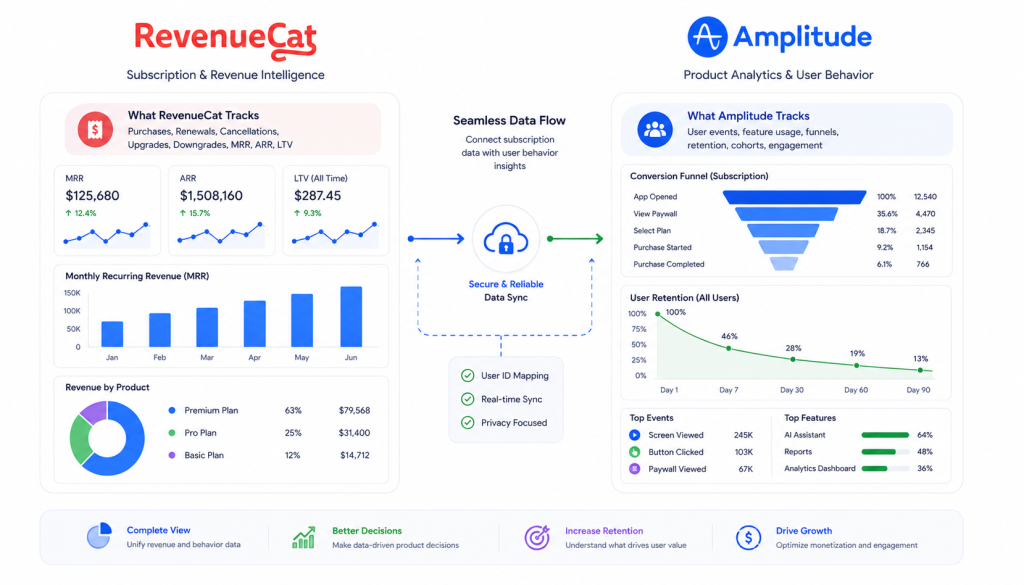
RevenueCat vs Amplitude: Best Way to Track Subscription Revenue in Mobile Apps (2026)
Table of Contents
ToggleIf you run a subscription app, you have probably asked whether RevenueCat or Amplitude should be your source of truth for revenue. The short answer is that they do different jobs, and most subscription apps get the best results from using both with clear rules about who owns what.
This RevenueCat vs Amplitude guide explains what each tool is built for, where they overlap, how to connect them without breaking your numbers, and how to add attribution on top. The setup details below were checked against RevenueCat and Amplitude documentation in October 2026.
RevenueCat vs Amplitude at a Glance
- RevenueCat manages in-app subscriptions and purchases across the App Store and Google Play, and reports subscription revenue.
- Amplitude is a product analytics platform. It shows what users do in your app and which behaviors lead to retention and revenue.
- Together, RevenueCat answers “what happened with money” and Amplitude helps answer “why”.
What RevenueCat Does
RevenueCat sits between your app and the stores. You integrate one SDK, and RevenueCat handles purchase processing, entitlements and subscription status for iOS and Android. It also records subscription lifecycle events such as trial starts, renewals, cancellations and billing issues, and it can send those events to other tools.
That matters because subscription state is hard to rebuild yourself. Trials, grace periods, billing retries, upgrades and refunds all change what “an active subscriber” means. RevenueCat keeps that logic on its servers so your client code does not have to guess.
RevenueCat Pricing
According to RevenueCat’s account management documentation, RevenueCat stays free until you reach $2.5k in Monthly Tracked Revenue (MTR). Above that, Pro plan customers pay 1% of MTR, calculated before store commission and taxes. Check the current terms before you budget, because pricing pages change.
What Amplitude Does
Amplitude tracks events your app sends and turns them into funnels, retention charts, cohorts and user journeys. It is the place to ask behavioral questions: which onboarding path leads to more trial starts, where users leave before the paywall, and which features your longest-retained subscribers use.
Amplitude Pricing and Limits
Amplitude’s pricing page lists a free plan with no time limit and a volume limit of 2M events per month, and a Plus plan that starts at $0 for the first 2M events. Older articles quote a 10M event free tier, which no longer matches the current page. The free plan includes A/B/n Web Experimentation, while Feature Experimentation A/B/n testing is listed on the Growth and Enterprise plans.
RevenueCat vs Amplitude: Direct Comparison
| Question | RevenueCat | Amplitude |
|---|---|---|
| Main job | Subscription and purchase management | Product and behavior analytics |
| Manages entitlements across iOS and Android | Yes | No |
| Subscription lifecycle events | Built in | Only if you send them yourself or import them from RevenueCat |
| Funnels, retention and cohorts | Not its focus | Core feature |
| Tests | Experiments on offerings, such as price and trial length (Pro and Enterprise plans) | Experimentation features, with plan limits |
| Free tier | Free until $2.5k MTR | Free plan with 2M events per month |
RevenueCat’s Experiments documentation says tests are built on Offerings, so you can test more than price, including trial length, subscription length and product grouping. Neither tool replaces the other. One records the subscription, the other explains behavior around it.
When to Use Which Tool
Use RevenueCat When You Need To
- Know subscription status per user and unlock features reliably.
- Measure trial conversion, renewals and churn by product.
- Avoid building purchase validation and store notification handling yourself.
- Send subscription revenue to attribution tools.
Use Amplitude When You Need To
- See which behaviors come before a subscription.
- Build onboarding and paywall funnels.
- Compare retention across cohorts and acquisition sources.
- Run product experiments tied to behavior.
How to Connect RevenueCat to Amplitude
RevenueCat can send subscription events to Amplitude, so revenue and behavior live in one place. The steps below follow RevenueCat’s Amplitude integration guide.
Step 1: Use the Same User ID in Both SDKs
Configure the Amplitude SDK with the same App User ID that RevenueCat uses, either at initialization or with setUserId. This is what lets both tools describe one person. On RevenueCat’s side, identifying customers works through logIn. Note how it behaves: if the current ID is anonymous and the new ID is unused, the two are merged and purchases carry over. If the ID you pass already has an anonymous alias, or the current ID is not anonymous, the user is switched and no purchases are transferred.
// iOS: set the same ID in both SDKs after login
let userId = "user_12345"

Purchases.shared.logIn(userId) { customerInfo, created, error in
    // handle result
}

amplitude.setUserId(userId: userId)
// Android: set the same ID in both SDKs after login
val userId = "user_12345"
Purchases.sharedInstance.logInWith(userId, ::showError) { customerInfo, created ->
// handle result
}
amplitude.setUserId(userId)The Swift snippet uses the Amplitude object from Amplitude’s Swift SDK, and the Android one uses the Android-Kotlin SDK. Amplitude’s documentation also points to a Unified SDK if you want Analytics, Experiment and Session Replay together, so pick one path before you start. If your RevenueCat ID and Amplitude ID are different by design, RevenueCat supports two optional customer attributes, $amplitudeDeviceId and $amplitudeUserId, which tell it which Amplitude identity to use.
Step 2: Turn On the Integration
In the RevenueCat dashboard, open your project, go to Integrations and choose Amplitude. Add your Amplitude API key, confirm the event names, choose how revenue is reported, and if your Amplitude project is on EU servers, set the region to EU.
Step 3: Know the Event Names
By default RevenueCat sends events with names like these, and you can rename them in the integration settings:
rc_initial_purchase_eventrc_trial_started_eventrc_trial_converted_eventrc_trial_cancelled_eventrc_renewal_eventrc_cancellation_eventrc_billing_issue_eventrc_expiration_eventrc_product_change_event
There are more, including uncancellation, non-subscription purchase and subscription paused events. The names are easy to get wrong from memory, and older posts show shortened versions that do not match the current defaults, so copy them from the integration screen.
Step 4: Choose Gross or Net Revenue
You decide whether RevenueCat reports gross revenue, before store commission, or a net figure after commission and estimated taxes. Pick one and write it down, because mixing the two across tools is a common reason finance and marketing numbers disagree. RevenueCat also states that revenue in this integration is always reported in USD, with the original currency kept in a currency field.
Step 5: Verify the Events Arrive
Run a sandbox purchase, then look for the event names above in Amplitude. Check that the user ID matches the one your app sets, and that revenue and currency look right. Two things can look like bugs but are not: without Platform Server Notifications, RevenueCat says expiration events can be delayed by about an hour, and some events are store specific, for example the paused event applies only to Google Play.
Build a Subscription Funnel in Amplitude
Once events flow, you can build the views that justify the integration. A basic path for a trial-based app is: onboarding completed, paywall viewed, trial started, trial converted. Use your own app events for the first two steps and the RevenueCat events for the last two. For churn, compare behavior in the days before a cancellation event with behavior from users who renewed. If a funnel shows a gap between paywall views and trial starts, that is a product question for Amplitude, while a gap between trial starts and conversions is where RevenueCat’s subscription data and your trial design matter.
Add Attribution: RevenueCat, Amplitude and an MMP
If you buy installs, you also need to know which campaign produced each paying subscriber. A mobile measurement partner does that part, and the three tools split the work:
- The MMP records the install and its source. If this is new to you, read what mobile attribution is.
- RevenueCat records the subscription and sends revenue events onward.
- Amplitude analyzes the behavior in between.
RevenueCat documents an AppsFlyer integration. Its main requirement is the $appsflyerId attribute, which you set in the app. RevenueCat also recommends device identifiers such as the IDFA and IDFV on iOS and the Google Advertising ID on Android, and its page warns that some events may not be delivered if the AppsFlyer ID is missing. It also says to remove any client-side purchase tracking, or revenue may be double counted in AppsFlyer. For the AppsFlyer side, see the AppsFlyer setup guide, and for tool trade-offs, AppsFlyer vs Adjust.
Common Mistakes
- Different user IDs in each SDK. Events cannot be joined, so funnels stop at the paywall. Set the same ID right after login.
- Counting revenue in two places. If your app logs purchases as Amplitude events and RevenueCat also sends them, revenue is doubled. Choose one source of truth for revenue and keep the other for behavior.
- Treating Amplitude revenue as an accounting number. It is a USD-converted analytics figure, so reconcile against store reports and RevenueCat for finance questions.
- Memorizing event names. Copy the exact defaults from the integration screen, or rename them once and document it.
- Ignoring trial cancellations. Forward
rc_trial_cancelled_eventso you can study why users leave before paying. - Skipping validation. After any change to IDs or integrations, repeat a sandbox test. The mobile attribution audit covers a wider checklist, and the Firebase Analytics setup guide helps if Firebase is also in your stack.
Which Setup Should You Choose?
The honest answer to the RevenueCat vs Amplitude question depends on your stage. For a small subscription app with no paid acquisition, start with RevenueCat alone. It gives you subscription state and revenue metrics with little code, and you can add analytics later. Add Amplitude when you have enough traffic to ask behavioral questions. Add an MMP when you start paying for installs. If you outgrow free limits, compare costs using the current pricing pages, since both vendors change them.
FAQ
Is RevenueCat better than Amplitude for subscription tracking?
They do different jobs. RevenueCat manages purchases and subscription status and reports subscription revenue. Amplitude analyzes user behavior. For subscription revenue, RevenueCat is the better source, and most subscription apps benefit from using both.
Can I use Amplitude instead of RevenueCat?
You can log purchase events in Amplitude, but you would still need your own way to validate purchases, manage entitlements and handle subscription states such as trials and billing retries. RevenueCat handles that work, and it can send its events to Amplitude.
How do I connect RevenueCat to Amplitude?
Use the same App User ID in both SDKs, then open Integrations in the RevenueCat dashboard, choose Amplitude, add your Amplitude API key, confirm the event names and choose gross or net revenue reporting. Test with a sandbox purchase and look for the events in Amplitude.
Does RevenueCat integrate with AppsFlyer?
Yes. RevenueCat documents an AppsFlyer integration. You set the AppsFlyer ID as a customer attribute, enable the integration in the dashboard and choose event names. RevenueCat recommends removing client-side purchase tracking to avoid double counted revenue.
How much does RevenueCat cost?
RevenueCat’s documentation says it stays free until you reach $2.5k in Monthly Tracked Revenue. Above that, Pro plan customers pay 1% of MTR, calculated before store commission and taxes. Check the current pricing page before you plan a budget.
How much does Amplitude cost?
Amplitude lists a free plan with no time limit and a limit of 2M events per month. Paid plans are priced by events and are listed as custom for the Growth and Enterprise tiers, so check the pricing page for current details.
Why do my RevenueCat and Amplitude numbers not match?
The usual causes are different user IDs, a mix of gross and net revenue settings, revenue being counted in two places, and Amplitude reporting revenue in USD after conversion. Pick one source of truth for revenue and run a sandbox test after any change.
If you want help connecting RevenueCat, Amplitude and attribution without double counting, send your platform and a short description to contact@alfahadhridoy.com and I will reply by email.