What the Mobile App Attribution Debugger Checks
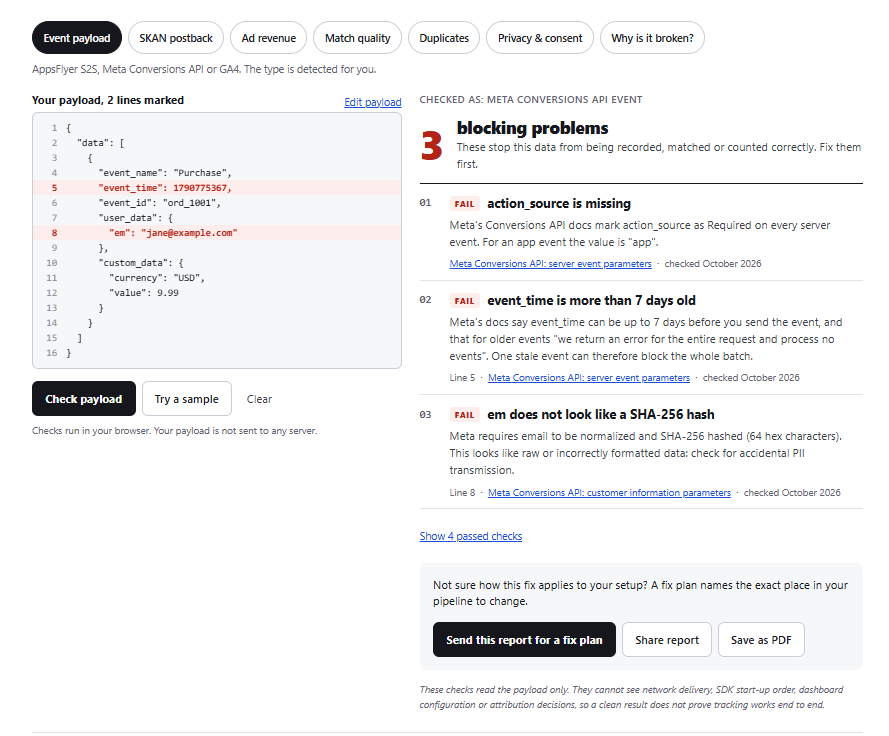
The tool has seven checks. Each one reads a specific type of payload and compares it, field by field, with the documented requirements.
- Event payload: AppsFlyer S2S, Meta Conversions API and GA4 events. The payload type is detected automatically.
- SKAN postback: SKAdNetwork 3 and 4 postbacks, including conversion values and postback windows.
- Ad revenue: impression-level revenue from AdMob, ironSource, AppLovin MAX and AppsFlyer, including unit and currency problems.
- Match quality: the customer information fields that affect Meta Event Match Quality, such as missing identifiers or values that are not correctly hashed.
- Duplicates: compares two events to show whether they will be deduplicated or counted twice.
- Privacy and consent: flags privacy and consent problems in the payload.
- Why is it broken?: starts from a symptom, such as installs showing as organic, and narrows down the likely root cause.
Each finding points to the exact line in your payload, explains the problem in plain language, and links to the official page the rule comes from, with the date it was last checked.
What the Mobile App Attribution Debugger Cannot See
The debugger reads the payload only. It cannot see:
- whether the request reached the endpoint, or what the endpoint returned
- SDK start-up order and timing inside your app
- settings in your MMP dashboard, Meta Events Manager, Google Ads or App Store Connect
- how a platform decided to attribute an install
A failed check points to a documented rule your payload breaks, so it is the right place to start. A clean result means something narrower: the payload itself follows the rules. It does not prove that your tracking works end to end.
How to Use It
Using the mobile app attribution debugger takes a few seconds:
- Choose the tab that matches your payload, or use Event payload and let the tool detect the type.
- Paste the JSON. A test event works best, since it shows the same structure without real customer data.
- Select Check payload and read the findings, starting with the ones marked FAIL.
- Use Share report or Save as PDF to pass the result to your developer or team.
When the Fix Depends on Your Setup
Some findings are fixed by changing one field. Others depend on where the event is built: the app, the SDK configuration, the MMP, or a server-side pipeline. In those cases, a written fix plan maps each finding to the exact place in your setup to change. Reports are reviewed asynchronously, in writing.
Related Guides
- What is mobile attribution?
- AppsFlyer setup guide for iOS and Android
- SKAdNetwork setup guide for iOS apps
For the platform rules behind the checks, see Meta’s Conversions API server event parameters and Apple’s SKAdNetwork documentation.
Frequently Asked Questions
Why are my Meta iOS installs showing as organic in my MMP?
Usually because Meta attributed those installs through SKAdNetwork or Aggregated Event Measurement, which report in aggregate and are not matched to individual devices. User-level MMP reports therefore show them as organic. Other common causes are a missing or misconfigured Meta integration in the MMP, and events sent without the identifiers Meta needs to match them. The payload checks can rule out the last cause. The first two need a look at your MMP and Meta settings.
Why is my SKAN conversion value null?
Most often because the install did not reach Apple’s crowd anonymity threshold, so Apple withholds the fine conversion value. In SKAdNetwork 4, depending on the crowd anonymity tier, a postback may carry only a coarse value or no value at all, and postbacks from the second and third conversion windows never include a fine value. Paste the postback into the SKAN check to see which case applies.
Why is my AppsFlyer S2S event not recorded?
The most common payload causes are a missing or wrong appsflyer_id, an app ID in the wrong format, missing required fields, and timestamps or event values in a format the API does not accept. If the payload passes these checks, the problem is usually in authentication or in how the request is sent, which the debugger cannot see.
Why is my Meta Event Match Quality low?
Low Event Match Quality usually means Meta received too few customer information parameters, or received them without the required normalization and hashing, so it could not match the event to a person. The Match quality check lists which identifiers are present, which are missing, and which do not look correctly hashed.
Is my payload uploaded or stored anywhere?
No. The mobile app attribution debugger runs every check in your browser. If you use Send this report for a fix plan, only the titles of the problems found are passed along, not the payload itself.
Does a clean result mean my tracking works?
No. A clean result from the mobile app attribution debugger means the payload follows the documented rules. Delivery, SDK timing, dashboard settings and attribution decisions happen outside the payload and need to be checked separately.
Is this tool affiliated with Apple, Meta, Google or AppsFlyer?
No. It is an independent tool. Product names are used only to describe which payloads it checks.
About the Author
Built by Al-Fahad Hridoy, a mobile app attribution and tracking consultant working with AppsFlyer, Adjust, SKAdNetwork, Firebase and GA4, Meta Conversions API and server-side tracking. Every check in this debugger is based on the official documentation linked in its finding, so you can verify each rule yourself.
Apple, SKAdNetwork, Meta, Google, GA4, Firebase, AppsFlyer, Adjust, AdMob, ironSource and AppLovin are trademarks of their respective owners. This is an independent tool and is not affiliated with or endorsed by any of them.