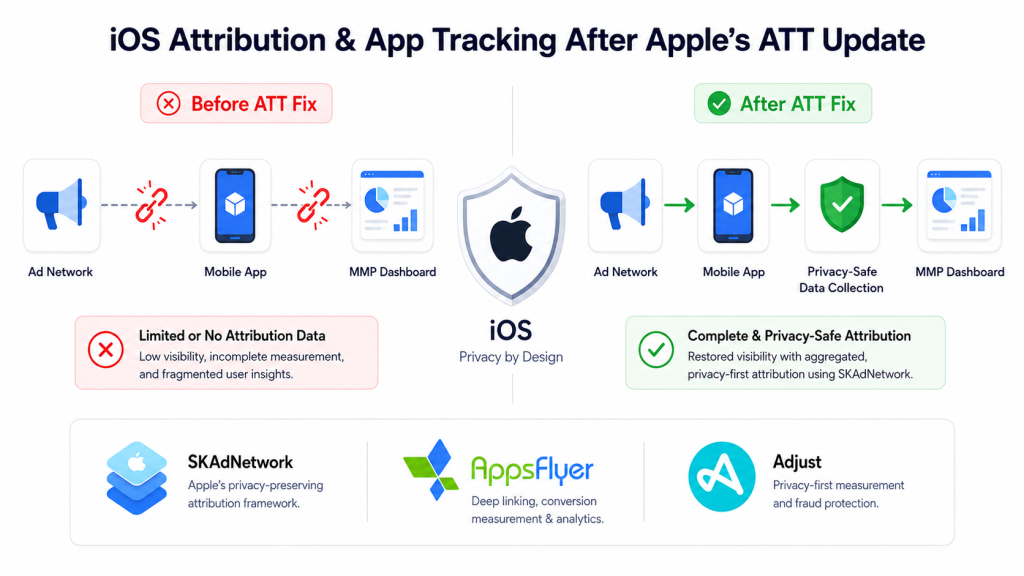
How to Fix Broken iOS Attribution After ATT: 6-Step Guide
If your iOS attribution has been unreliable since Apple’s App Tracking Transparency (ATT) framework arrived, this guide shows you how to fix iOS attribution, step by step, starting with how to find what is actually broken. It covers SKAdNetwork, your MMP setup, conversion values, the ATT prompt and testing, plus where Apple’s newer AdAttributionKit fits in.The short answer on how to fix iOS attribution: it is usually fixable, but there is no single switch to flip. It takes a correct SDK setup, a sound conversion value design and a realistic view of what Apple allows. I checked this guide against Apple’s current documentation and the MMP help pages in October 2026, and I note where a detail depends on your vendor.
Why iOS Attribution Breaks After ATT
Before iOS 14.5, an MMP such as AppsFlyer or Adjust could match an ad click to an install using the IDFA, the Identifier for Advertisers. ATT changed that. Apps must now ask users for permission before accessing the IDFA, and many users say no. For users who decline, there is no device identifier to match on.For most apps, that showed up as:
- Install numbers that no longer match ad network dashboards
- A larger share of paid installs showing as organic or unattributed
- ROAS figures that are harder to trust
- Less post-install detail for each campaign
Apple did not remove attribution. It moved a large part of it into SKAdNetwork, a privacy-preserving system that sends aggregated, signed postbacks instead of user-level data. If you are new to how all of this fits together, start with
what mobile attribution is and how it works.
What “Unattributed” Actually Means
When an install appears as organic or unattributed, one of three things is usually happening.
- The user declined ATT. No IDFA is available, so deterministic matching is impossible. This is expected and not a bug.
- SKAdNetwork is not set up correctly. The app, the MMP or the network is not configured to send and receive the signals Apple provides.
- Postbacks are not reaching your MMP. Apple sends them, but they are not arriving or being processed as you expect.
Each cause has a different fix, which is why the first step is a proper audit.
How to Fix iOS Attribution in 6 Steps
Work through these in order to fix broken iOS attribution without guesswork. Skipping the audit is the most common reason people spend days changing the wrong setting.
Step 1: Audit What Is Actually Broken
Check these four things in your MMP dashboard before you change anything.
- ATT opt-in rate. Look at the share of iOS installs that arrive with an IDFA. A small share is normal after ATT. It means SKAdNetwork has to carry most of your paid iOS measurement.
- SKAN status. Confirm SKAdNetwork support is enabled and a conversion value setup exists. Menu names change often, so look for the SKAdNetwork or SKAN section of your MMP rather than relying on a fixed path.
- Unattributed rate. Compare the share of paid iOS installs showing as unattributed with what your ATT opt-in rate alone would explain. A large or growing gap points to a configuration problem.
- Postback delivery. Verify that SKAdNetwork postbacks are arriving at all. Zero, or far below your ad-driven install volume, points to a setup problem.
Step 2: Configure SKAdNetwork Correctly
SKAdNetwork does not use the IDFA. Apple signs and sends postbacks to the ad network, and to you if you opt in to a copy. The API has three participants: ad networks, source apps that display ads, and advertised apps that update conversion values as people engage. Read Apple’s
SKAdNetwork documentation once, because it explains who is responsible for what. For a longer walkthrough, see the
SKAdNetwork setup guide.
2.1 Turn on SKAdNetwork support in your MMP
Enable SKAN in your MMP and update to a current SDK. The MMP handles the plumbing, but your app still has to call the conversion value API, which the SDK does for you when the conversion value setup is live.
2.2 Understand what goes in Info.plist
This is the part older guides get wrong. Apple documents the
SKAdNetworkItems list of ad network IDs as a requirement for a
source app, the app that displays ads from networks. If your app only advertises itself and does not show third party ads, you do not add network IDs to it to receive install attribution. You add them only if you also monetize with ads from those networks. See Apple’s pages on
configuring a source app and
configuring an advertised app.What an advertised app can add is a postback copy endpoint. Apple documents
NSAdvertisingAttributionReportEndpoint as the optional key for receiving a copy of the winning postback. AppsFlyer and Adjust each document their own endpoint value, and AdAttributionKit uses its own key as well. Copy the exact keys and values from your vendor’s current instructions and do not guess them. Changing Info.plist needs a new app release.
2.3 Use SKAN 4 or later behavior
SKAN 4 arrived with iOS 16.1 and added three conversion windows and coarse conversion values, which gives you more than a single early snapshot. Both major MMPs support it. Apple’s
SKAdNetwork 4 release notes explain what changed.
Where AdAttributionKit Fits In
Apple introduced AdAttributionKit at WWDC 2024, and it is available from iOS 17.4. Apple’s current SKAdNetwork page now tells developers to use AdAttributionKit for app ad campaigns, and it documents how the two interoperate. That does not mean you should rip out your SKAdNetwork setup. It means you should plan for both.What AdAttributionKit adds, based on Apple’s documentation:
- Re-engagement measurement for users who already have your app, which SKAdNetwork did not cover.
- Support for alternative app marketplaces in addition to the App Store.
- Testing improvements, such as shorter time windows while you test.
- No ATT prompt required to call the attribution APIs, as with SKAdNetwork.
The practical step now is simple: keep your SKAdNetwork setup healthy, then ask your MMP and each ad network where their AdAttributionKit support stands. Support varies by vendor and changes quickly, so verify it on their pages. Apple’s
ad attribution page is the starting point.
Step 3: Design a Conversion Value Setup That Matches Your Business
This is the most misunderstood part of iOS attribution. Your app reports what happened after an install through conversion values, and you decide what they mean. Without a thoughtful design, you get almost no useful post-install data.Under SKAN 4, the first postback can carry a fine value from 0 to 63. The second and third postbacks carry coarse values only: low, medium or high. Whether you receive the detail also depends on Apple’s crowd anonymity thresholds, so low volume campaigns can return less. See Apple’s guide to
postbacks in multiple conversion windows.A few rules keep the design sane:
- Map values to early actions that actually predict value, such as completing onboarding, starting a trial or making a first purchase.
- For ads signed with SKAN 4 or later, Apple allows any valid value on each update, so values do not have to keep increasing. Older SKAN 3 logic required each update to be higher than the last, and some MMP setups still follow that rule, so read your vendor’s documentation.
- Decide up front which event wins when several happen in the same window, and write that rule down.
A simple example for a subscription app, to adapt and not copy:
| Value | Meaning |
|---|
| 0 | Install only, no action |
| 1 | Completed onboarding |
| 2 | Started free trial |
| 3 | Viewed pricing |
| 4 | Started checkout |
| 5 | Purchased, lower value tier |
| 6 | Purchased, mid value tier |
| 7 | Purchased, high value tier |
Configure the final mapping in your MMP’s SKAdNetwork or conversion value tool. AppsFlyer and Adjust both provide one, and their menu names change often.
Step 4: Fix Your MMP and SDK Configuration
Even with SKAdNetwork set up, MMP configuration can still break attribution.
4.1 Update the SDK
Run a current SDK version. MMPs ship SKAN-related fixes regularly, and old versions carry known problems. The
AppsFlyer setup guide covers the install steps, and the
AppsFlyer vs Adjust comparison helps if you are still choosing a vendor.
4.2 Get the ATT prompt and SDK start order right
If your app shows the ATT prompt, the MMP SDK should not start before the user has answered, or the IDFA will not be included for users who allow tracking. You do not have to guess how. AppsFlyer’s iOS SDK provides
waitForATTUserAuthorization(timeoutInterval:), which you call before
start() so the SDK waits for the user’s answer, up to the timeout you set. Adjust documents its own App Tracking Transparency wrapper in its help center. Use the method your SDK version documents.The flow you want is: app launches, ATT prompt is shown at a sensible moment, the user answers, then the SDK starts with the resulting status. Remember that ATT is optional for SKAdNetwork itself, so a declined or never-shown prompt does not stop SKAN postbacks.
4.3 Check ad network integrations
Each network you run campaigns on needs an active integration in your MMP with install and in-app event postbacks enabled. Go through every network in turn. A missing integration looks exactly like an attribution failure.
Step 5: Set Realistic Expectations for Users Who Decline ATT
Older guides tell you to switch on fingerprinting or probabilistic matching for users who say no. Treat that advice carefully. Apple’s rules do not allow fingerprinting, as its
user privacy and data use page explains, and MMPs describe their own approaches differently. Adjust, for example, documents a probabilistic attribution model and a stricter Extended Privacy Measurement model for devices where ATT is denied or not determined.Because policies and methods differ by vendor and change over time, do this instead:
- Ask your MMP to explain in writing how it attributes users who decline ATT, and which of its settings you control.
- Accept that this will be less precise than deterministic matching, and that it will not recover every install.
- Use SKAdNetwork and aggregated campaign level reporting as your main iOS performance signal, and judge channels on trends and totals.
Step 6: Validate With Real Tests
After changes, validate before you put more spend behind iOS.
- Use a real device. Run the full install flow, confirm the ATT prompt and that your events fire.
- Use your MMP’s test tools. AppsFlyer provides SDK Integration Tests in its dashboard, and the IDFA check needs ATT permission. Adjust documents its testing tools, including a testing console and guides for install and event recording.
- Test SKAN timing. Apple lets you shorten attribution time windows with a downloaded profile and inspect postbacks through a proxy. See testing ad attributions with a downloaded profile.
- Compare with network reports. Some variance is normal because networks and MMPs count differently. A gap that is large or widening points to a real issue.
How Long Does the Fix Take?
These are rough planning estimates, not guarantees, and they assume you have access to both the app code and the MMP.
| Task | Typical effort |
|---|
| Audit and SKAN configuration in the MMP | A few hours |
| Conversion value design | Half a day to a full day |
| SDK update and ATT order fix | Days, because it needs an app release |
| Network integration review | A couple of hours |
| Testing and validation | A day or two, plus postback delays |
Anything that changes the app, such as the SDK version, Info.plist or the ATT flow, has to go through App Store review, so build that into your plan.
Common Mistakes to Avoid
- Showing the ATT prompt too early. Asking on first launch, before people understand the app, tends to hurt opt-in. Ask at a moment where the value is clear.
- Copying a generic conversion value template. The design must reflect the early actions that predict value in your own funnel.
- Adding network IDs to the wrong app. Network IDs belong in source apps that display ads. Putting them in an advertised-only app does not create attribution.
Check Your Payloads Before You Debug Further
Many iOS problems first show up as a malformed event payload. You can paste a test payload into the free
mobile app attribution debugger and see which documented rule it breaks, with a link to the official page for that rule. It reads the payload only, so a clean result does not prove your tracking works end to end, but a failed check tells you where to start.
FAQ
Why are my iOS installs showing as unattributed even after fixing SKAdNetwork?
Check three things in order: whether SKAN is enabled in your MMP, whether your conversion value setup is saved and live, and whether postbacks are actually arriving. Also remember that users who decline ATT cannot be matched by device identifier, so some unattributed or organic installs are expected. Compare the gap against your ATT opt-in rate before you assume something is broken.
How long do SKAdNetwork postbacks take to arrive?
They are never real time. Apple sends a postback only after a conversion window closes and adds a randomized delay on top, so the first postback can take a day or more and later ones can take longer. Exact timing differs by SKAN version and window, so check Apple’s documentation before you declare a setup broken.
Do I need to add SKAdNetwork IDs to my Info.plist?
Only if your app shows ads from other networks. Apple documents the SKAdNetworkItems list as a source app requirement, meaning the app that displays the ad. If your app only advertises itself and does not show third party ads, your focus is the conversion value logic and, if you want a copy of the winning postback, the postback copy endpoint your MMP documents.
Do I need to ask for ATT permission before using SKAdNetwork?
No. Apple states that apps do not need App Tracking Transparency authorization before calling SKAdNetwork APIs. ATT only matters for access to the IDFA, which your MMP can use for deterministic matching when the user allows it.
Can I use SKAdNetwork and my MMP’s other attribution methods together?
Yes. Your MMP combines SKAdNetwork postbacks with whatever other signals it is allowed to use for each user. How it treats users who decline ATT differs by vendor and changes over time, so ask your MMP for its current approach instead of assuming one.
What ATT opt-in rate should I expect?
There is no single number worth planning around. Opt-in varies by app category, region and where in the app the prompt appears. Benchmark against your own trend over time and watch what happens when you move the prompt.
Do I need to move to AdAttributionKit?
Apple recommends AdAttributionKit for app ad campaigns, and it works alongside SKAdNetwork, with documented interoperability. You do not need to rebuild your setup in one step. Keep SKAdNetwork working and ask your MMP and the ad networks you use where their AdAttributionKit support stands.
My MMP shows zero SKAdNetwork postbacks. What is wrong?
Zero postbacks usually means SKAN is not enabled in your MMP, no eligible ad installs have reached a closed conversion window yet, or your app is not calling the conversion value API. Confirm the SDK version, run a test install through your MMP’s testing tools and wait through the delay before you change anything else.If you want a second pair of eyes on your iOS setup, send your MMP and a short description of the problem to
contact@alfahadhridoy.com and I will reply by email.