WhatsApp BSUID: 6 Costly CAPI Mistakes to Avoid in CTWA Ads
Table of Contents
ToggleThe WhatsApp BSUID rollout is changing how Meta identifies the people who message a business. As usernames and Business-Scoped User IDs spread, the phone number you used to rely on can disappear from your webhooks. Business Solution Providers have already covered the general webhook and CRM impact, so this guide stays on one narrower question: if you run Click-to-WhatsApp ads and send conversions to the Meta Conversions API, what can break, and what does not?
Everything below comes from Meta’s own documentation, checked in October 2026. Where Meta’s documentation is silent, I say so instead of guessing, because several claims circulating about BSUIDs and ad attribution have no Meta source behind them.
What Meta Confirms About CTWA Conversions
Meta’s Conversions API guide for business messaging describes two ways to report a WhatsApp conversion, and the difference matters for the BSUID question.
The click ID path
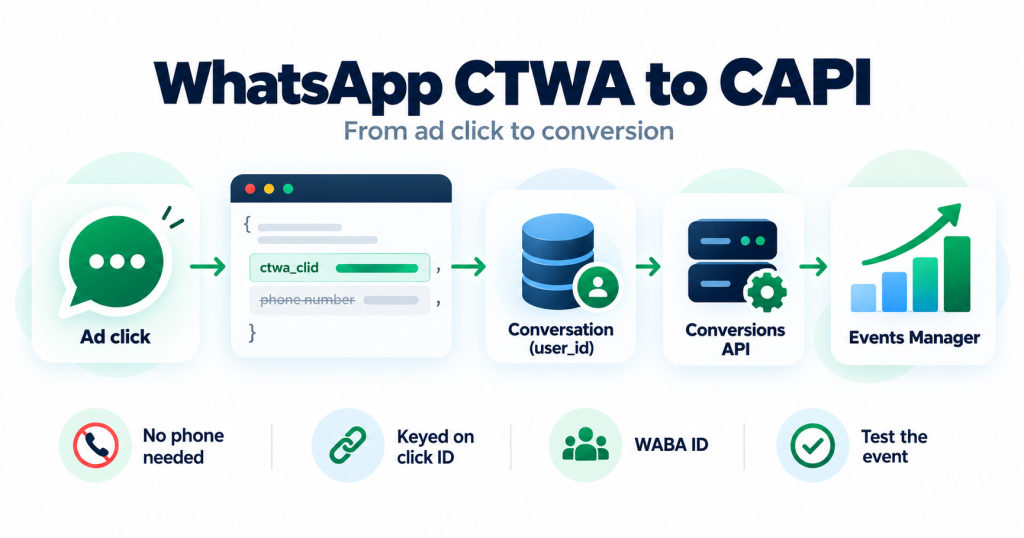
When you have the click ID, the event carries ctwa_clid and whatsapp_business_account_id inside user_data. The click ID comes from the referral object in the messages webhook, which Meta added to that object on September 27, 2023, according to the WhatsApp changelog. On this path Meta’s documentation does not use a phone number and does not give a time limit for sending the event after the click.
The fallback path
If you do not have a click ID, the event needs page_id, the WhatsApp Business Account ID and at least one hashed customer parameter, such as email or phone. Values are normalized and hashed with SHA-256. This path attributes events to an ad interaction from the past seven days, is available only in a subset of countries and, in Meta’s words, matching is not guaranteed. An event whose only identifier is external_id is treated as having no identifier.
Meta’s documentation for this API does not mention BSUIDs or usernames anywhere. So the honest summary is that the click ID path does not depend on a phone number, and the fallback path does depend on customer data that a username-only user may never have given you.
What the WhatsApp BSUID Change Actually Touches
Meta’s business-scoped user IDs documentation sets out the facts that matter for tracking:
- A BSUID identifies a WhatsApp user for one business. It is scoped to a business portfolio and works only with phone numbers owned by that portfolio. Its format is a two-letter country code, a period and up to 128 alphanumeric characters, and you must use the whole value.
- It changes when the user changes number. A user’s BSUID is regenerated when they change their phone number, which triggers a system message webhook.
- Timing. BSUIDs began appearing in webhooks in early April 2026. Business username reservation and claiming started June 29, 2026, and sending messages to a BSUID is supported from July 2026. WhatsApp is rolling usernames out gradually through 2026.
- The BSUID is always in the webhook. It appears as
user_idregardless of whether the user has a username. - The phone number can be missing. If a user has adopted a username, the phone number (
wa_id) is omitted unless you messaged or called that user’s number in the previous 30 days, received a message or call from it in the previous 30 days, or the user is in your contact book. These checks run per business phone number.
Users without a username keep arriving with a phone number as before. The risk is for the growing group that does not. If you want the broader picture of how identifiers work across channels, what mobile attribution is covers the same identity problem from the app side.
A Username-Only Lead, From Click to Conversion
Walk one lead through the pipeline and the gap is easy to see.
A person taps your Click-to-WhatsApp ad and sends a message. The inbound webhook carries a referral object with the ad details and ctwa_clid, and the sender is identified by user_id. If that person uses a username and none of the retention conditions apply, there is no wa_id in the payload. The correct move is to open or find the conversation keyed on user_id and store the click ID on that conversation immediately. Meta’s webhook reference says the referral is included when a message is sent through a Click-to-WhatsApp ad, but it does not say it only appears on the first message, so store the click ID whenever it arrives rather than assuming a particular message.
Later, when that conversation reaches a won or purchase state, you build the Conversions API event from what you stored: the click ID and the WhatsApp Business Account ID. A pipeline that instead waits until send time to look the lead up by phone, or that wrote the click ID against a phone-keyed record, is the one that quietly loses conversions.
6 Mistakes to Avoid Before Phone Numbers Disappear
Run this WhatsApp BSUID checklist against your own pipeline. Each item is a place where a missing phone number does damage in your own code, not in Meta’s.
1. Assuming wa_id is always present
A webhook handler that reads wa_id without a fallback can throw an error, skip the message or write a blank contact when the field is absent. Search your code for every read of that field and confirm the message still processes with only user_id.
2. Keying the click ID on the phone number
If ctwa_clid is saved against a phone-keyed record, a username-only user has nowhere to store it. Capture the click ID from the referral object and store it on the conversation, keyed by user_id.
3. Matching CRM contacts by phone only
A CRM that finds leads only by phone number will create a duplicate or an unmatched lead for every username-only user. Add user_id as a stable identifier and treat the phone number as an extra attribute that may or may not be there.
4. Deduplicating on the phone number
Phone-based deduplication can split one person into two records or merge two people after a number change. Remember that a BSUID is regenerated when the user switches number, so it identifies a user within your portfolio at a point in time, not a permanent global person. Subscribe to the system webhooks that report a changed number or changed user ID, so you can link the old and new identifiers instead of creating a stranger.
5. Looking up the phone number at send time
Map each lead to its conversion through the conversation and its stored click ID, not through a phone lookup when the event is built. This is also where the fallback path bites: if the click ID is missing and the only customer data you have is a phone number you no longer receive, the fallback event has nothing to hash. Meta does not deduplicate business messaging events, so deduplicate on your side before you send, using the conversation as the key.
6. Never testing a conversation without a phone number
Send a test Purchase event for a conversation that has no wa_id, and confirm it goes out with the click ID and the WABA ID and appears in Events Manager test events. The free CAPI debugger can check the payload structure before you send it. A pipeline that has only ever been tested with phone numbers has not been tested for this change.
When the Click ID Is Missing Altogether
A missing phone number is not the only way to lose the click ID. Meta’s webhook reference states that ctwa_clid is omitted entirely for messages that originate from an ad in WhatsApp Status, and the changelog records the same change on October 20, 2025. If some of your campaigns run in that placement, those conversations arrive with no click ID, and you fall back to the hashed customer data path, with its seven day window, country limits and no guarantee of a match.
For those leads, collect an email address or another hashable parameter inside the conversation, when it fits your flow. Meta documents that the fallback path needs at least one customer parameter and the page_id. Do not rely on a phone number you may never receive.
Sending Messages, Not Just Receiving Them
If you send template or session messages, you can address a BSUID with the recipient parameter, supported from July 2026. Several details matter:
- If you include both a phone number in
toand a BSUID inrecipient, the phone number takes precedence. - BSUIDs cannot be used for one-tap, zero-tap or copy code authentication templates, which require phone numbers. Meta returns error
131062for message types that do not support BSUID recipients. - A BSUID works only with phone numbers in the same business portfolio. Messaging it from a different portfolio’s number fails.
- Meta recommends sending to phone numbers where you still have them, so you keep receiving phone numbers in webhooks.
Meta also provides a contact book, which stores phone numbers and BSUIDs when you message or receive messages from a user’s phone number. It is scoped to the business portfolio, needs no integration, and stores only interactions after launch.
What to Test, Not Assume
Some providers suggest that usernames or BSUIDs will lower Event Match Quality or weaken ad attribution. Meta’s documentation does not say this, and its Conversions API guide does not describe how BSUIDs affect the Click-to-WhatsApp conversion event. Treat any such claim as something to measure in your own account, not a fact to act on. If a tool makes the claim without a Meta source, it is unverified.
The reliable approach is the boring one: capture the click ID on the first inbound message, key your records on user_id, keep the phone number as optional data and test an event with no phone number before the change reaches your traffic.
FAQ
Does WhatsApp BSUID break Meta CAPI conversion tracking?
Meta does not say that it does. Its Conversions API guide describes a click ID path that uses ctwa_clid and the WhatsApp Business Account ID with no phone number, and a fallback path that needs a page ID and hashed customer data. Meta’s documentation does not mention BSUIDs, so test in your own account. The risk you control sits in your webhook handling, CRM matching and deduplication if they assume a phone number is always present.
Will usernames or BSUIDs lower my Event Match Quality?
Meta’s documentation does not state this, and it does not describe how BSUIDs affect the Click-to-WhatsApp conversion event. Treat any Event Match Quality or attribution claim as something to measure in your own account rather than a confirmed effect.
Where is the phone number when a user has a WhatsApp username?
It can be omitted from webhooks. Per business phone number, it is still included if you messaged or called that user in the last 30 days, received a message or call from them in the last 30 days, or the user is in your contact book. The BSUID is always present as user_id, so use it as the identifier for that user within your portfolio.
Should I store user_id or the phone number as my main key?
Store user_id as the key for a user within your business portfolio and treat the phone number as an optional attribute. A BSUID is scoped to one portfolio and is regenerated when the user changes phone number, so subscribe to the system webhooks that report a changed number or user ID and link the old and new identifiers.
What if ctwa_clid is missing from the webhook?
Meta’s webhook reference says ctwa_clid is omitted for messages that originate from an ad in WhatsApp Status. Without it, the Conversions API fallback path needs a page ID, the WhatsApp Business Account ID and at least one hashed customer parameter. It attributes to ad interactions from the past seven days, is available in a subset of countries and is not guaranteed to match.
Can I send WhatsApp messages to a BSUID now?
Yes, from July 2026 you can use the recipient parameter. If you send both a phone number in to and a BSUID in recipient, the phone number takes precedence. BSUIDs are not supported for one-tap, zero-tap or copy code authentication templates, and Meta recommends using phone numbers where you have them so you keep receiving phone numbers in webhooks.
If you are not sure your setup survives the WhatsApp BSUID change, send your setup description to contact@alfahadhridoy.com and I will reply by email with what to check first.