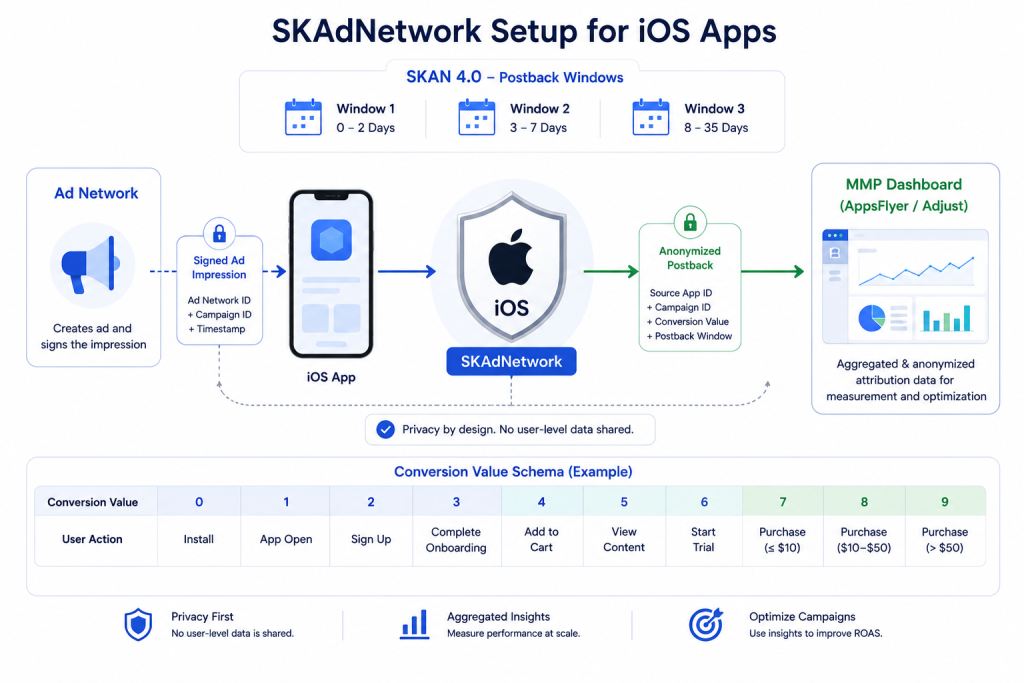
If you are running paid campaigns on iOS and your SKAdNetwork setup is incomplete or missing, your attribution data will be unreliable. This guide covers everything you need to implement SKAdNetwork correctly – from SKAN 4.0 configuration to conversion value schema design.”
The short answer: SKAdNetwork is not optional for iOS apps running paid UA. Without it, you are losing attribution data on the majority of your iOS installs.
Table of Contents
ToggleIn This Guide:
- What Is SKAdNetwork and Why Does It Matter
- How SKAdNetwork Works
- SKAN 4.0 vs Earlier Versions
- Step 1 — Enable SKAdNetwork in Your MMP
- Step 2 — Add SKAdNetwork IDs to Info.plist
- Step 3 — Design Your Conversion Value Schema
- Step 4 — Implement the SDK Correctly
- Step 5 — Configure Campaign Structure
- Step 6 — Validate and Monitor
- Common SKAdNetwork Mistakes
- FAQ
What Is SKAdNetwork Setup and Why Does It Matter
SKAdNetwork (SKAN) is Apple’s privacy-preserving mobile attribution framework, introduced in iOS 14.5 alongside the App Tracking Transparency (ATT) requirement. It allows ad networks to measure campaign performance — installs and post-install events — without using device-level identifiers like IDFA.
Before SKAdNetwork, mobile attribution relied on the IDFA to match ad clicks to app installs with near-perfect accuracy. After ATT, with most users declining to share their IDFA, that method became unreliable for the majority of iOS traffic.
SKAdNetwork solves this by moving attribution to the operating system level. iOS itself validates and sends attribution postbacks — anonymized and aggregated — directly to your MMP. No user-level data is shared.
For a deeper understanding of Apple’s privacy framework, see the official SKAdNetwork documentation.
Why it matters:
- Without SKAN, 60–75% of your iOS installs may show as unattributed
- Ad networks cannot optimize campaigns without postback data
- ROAS calculations become unreliable without SKAN attribution
- Apple requires SKAN compliance for apps running paid iOS campaigns
How SKAdNetwork Works
Understanding the SKAdNetwork flow is essential before implementation.
The basic flow:
- User sees an ad from an ad network
- Ad network signs the ad impression with its SKAdNetwork ID
- User clicks the ad and installs the app
- App registers the install with iOS using the MMP SDK
- App updates the conversion value based on post-install user behavior
- After the conversion window closes, iOS sends an anonymized postback to the ad network and your MMP
- Your MMP receives the postback and attributes the install to the correct campaign
Key points:
- Postbacks are sent by iOS — not by your app or MMP
- No user-level data is included in postbacks
- There is a timer delay between install and postback delivery
- Postback data is aggregated — you cannot see individual user journeys
SKAN 4.0 vs Earlier Versions
SKAN 4.0, introduced with iOS 16.1, brought significant improvements over SKAN 3.0. If your app supports iOS 16.1+, you should be using SKAN 4.0.
| Feature | SKAN 3.0 | SKAN 4.0 |
|---|---|---|
| Postback windows | 1 | 3 |
| Conversion value type | Fine (0–63) | Fine + Coarse (low/medium/high) |
| Web-to-app attribution | ❌ | ✅ |
| lockWindow support | ❌ | ✅ |
| Source identifier | 2 digits | Up to 4 digits |
| Crowd anonymity threshold | Fixed | Dynamic |
SKAN 4.0 key improvements:
Three postback windows — Instead of one postback, SKAN 4.0 sends up to three postbacks at different time intervals (0–2 days, 3–7 days, 8–35 days). This gives you a much more complete picture of post-install behavior over time.
Coarse conversion values — For installs that do not meet Apple’s crowd anonymity threshold, SKAN 4.0 returns a coarse value (low, medium, or high) instead of nothing. This means more installs return some attribution data.
lockWindow — Allows you to signal iOS that you are done updating the conversion value, triggering the postback timer immediately instead of waiting for the full window to expire.
Web-to-app attribution — SKAN 4.0 supports attributing installs that originated from web clicks, not just in-app ad clicks.
Step 1 — Enable SKAdNetwork in Your MMP
Before any implementation, enable SKAN in your MMP dashboard.
AppsFlyer:
- Go to My Apps → Select your app
- Navigate to Configuration → SKAdNetwork
- Toggle Enable SKAdNetwork to ON
- Select your SKAN version (enable SKAN 4.0 if your app supports iOS 16.1+)
- Save your settings
Adjust:
- Go to AppView → Select your app
- Navigate to SKAdNetwork settings
- Toggle SKAdNetwork to ON
- Select SKAN 4.0 if supported
- Save your settings
Both AppsFlyer and Adjust will automatically register your app with Apple’s SKAdNetwork system once enabled.
Step 2 — Add SKAdNetwork IDs to Info.plist
Every ad network you run campaigns on must have its SKAdNetwork ID listed in your app’s Info.plist file. If a network’s ID is missing, its campaigns will receive zero SKAN attribution.
How to add SKAdNetwork IDs:
In your app’s Info.plist, add the following structure:
xml
<key>SKAdNetworkItems</key>
<array>
  <dict>
    <key>SKAdNetworkIdentifier</key>
    <string>network-id-here.skadnetwork</string>
  </dict>
</array>
Add one entry for each ad network you use.
Where to find SKAdNetwork IDs:
- Meta (Facebook):
v9wttpbfk9.skadnetwork - Google:
cstr6suwn9.skadnetwork - TikTok:
ce2y4j37ch.skadnetwork - AppLovin:
22mmun2rnu.skadnetwork - ironSource:
su67r6k2v3.skadnetwork
Each ad network publishes its full list of SKAN IDs in its developer documentation. Check each network’s documentation for their current IDs — they can change over time.
Important: Every time you add a new ad network to your campaigns, you must add their SKAdNetwork ID to Info.plist and release a new app version. This requires going through App Store review.
Both AppsFlyer and Adjust provide consolidated Info.plist files with all major ad network IDs — download these from your MMP dashboard to simplify this process.
Step 3 — Design Your Conversion Value Schema
This is the most critical and most commonly misunderstood part of SKAdNetwork implementation. Your conversion value schema determines what post-install data you get from SKAN postbacks.
What are conversion values? SKAdNetwork uses a 6-bit integer (values 0–63) to communicate what happened after an install. You define the mapping — what each number means in terms of user behavior.
Rules for conversion values:
- Values can only increase — once set to 10, they cannot go back to 5
- The conversion window is typically 24 hours (configurable up to 72 hours in SKAN 4.0)
- The value must be updated within the conversion window
- Higher values generally indicate higher-value users
Designing your schema:
Start by identifying your most important early user actions — the events that happen within 24–72 hours of install that best predict long-term value.
Example schema for a subscription app:
| Value | Event | Meaning |
|---|---|---|
| 0 | Install only | No post-install action |
| 1 | App open — day 1 | Retained after install |
| 2 | Completed onboarding | Finished setup |
| 3 | Viewed key feature | Engaged with core value |
| 4 | Started free trial | High intent |
| 5 | Trial day 2 active | Retained in trial |
| 6 | Purchase initiated | Very high intent |
| 7 | Purchase completed — low value | Converted — low LTV |
| 8 | Purchase completed — mid value | Converted — mid LTV |
| 9 | Purchase completed — high value | Converted — high LTV |
Example schema for a gaming app:
| Value | Event | Meaning |
|---|---|---|
| 0 | Install only | No action |
| 1 | Tutorial completed | Onboarded |
| 2 | Level 3 reached | Early engagement |
| 3 | Level 10 reached | Strong engagement |
| 4 | First IAP — under $5 | Low value purchase |
| 5 | First IAP — $5–$20 | Mid value purchase |
| 6 | First IAP — over $20 | High value purchase |
| 7 | Day 2 retained | Retained player |
Configuring your schema in AppsFlyer: Go to Configuration → SKAdNetwork → Conversion Value Mapping and map each value to the corresponding in-app event.
Configuring your schema in Adjust: Go to AppView → SKAdNetwork → Conversion Values and define your mapping.
Step 4 — Implement the SDK Correctly
Correct SDK implementation is essential for SKAdNetwork to work. Common implementation errors silently break attribution without any obvious error messages.
4.1 — SDK initialization order
The most common implementation mistake: initializing the MMP SDK before showing the ATT prompt.
Correct order:
1. App launches
2. Show ATT prompt (request tracking authorization)
3. Wait for user response
4. Initialize MMP SDK with IDFA status
5. Register install with SKAdNetwork
If the MMP SDK initializes before the ATT prompt, IDFA will not be captured even when users grant permission.
4.2 — Update conversion values correctly
After installation, your app must update the conversion value as users complete key actions. This is done through your MMP SDK.
In AppsFlyer:
swift
AppsFlyerLib.shared().logEvent("af_purchase", withValues: [
    AFEventParamRevenue: 9.99
])
AppsFlyer automatically updates the SKAN conversion value based on your schema configuration.
In Adjust:
swift
Adjust.updateConversionValue(4)With Adjust, you can either update manually or use their automatic schema-based updating.
4.3 — Use lockWindow when appropriate. If a user completes your highest-value conversion event early (within the first few hours), use lockWindow to close the conversion window and trigger postback delivery immediately rather than waiting for the full timer.
Step 5 — Configure Campaign Structure
SKAdNetwork imposes limits on campaign data granularity. Understanding these limits helps you structure campaigns to get maximum useful data.
SKAN campaign ID limits:
- Each ad network can use up to 100 campaign IDs per app
- Campaign IDs must be numeric
- Source identifier in SKAN 4.0 provides up to 4 digits of campaign data
Best practices for campaign structure:
Limit active campaigns — Having too many active campaigns dilutes postback data across campaign IDs. Focus budget on fewer, larger campaigns to get statistically significant SKAN data.
Align campaign IDs with your MMP — Work with your ad networks to ensure their campaign IDs match the configuration in your MMP. Mismatched IDs result in unattributed postbacks.
Use campaign IDs strategically — In SKAN 4.0, the source identifier gives you up to 4 digits. Use the first 2 digits for campaign type and the last 2 for creative or audience — this maximizes the data you can extract from each postback.
Step 6 — Validate and Monitor
After implementation, validation is critical. SKAN errors are often silent — everything appears to work but attribution data is missing or incorrect.
6.1 — Test on a real device. SKAdNetwork does not work on simulators. Always test on a physical iOS device.
6.2 — Use your MMP testing tools
- AppsFlyer: Use the SDK Integration Tester to verify that installs are being registered and that conversion values are updating
- Adjust: Use the Testing Console to verify SKAN events are firing correctly
6.3 — Monitor postback delivery. After launching campaigns, monitor postback delivery in your MMP dashboard. You should see postbacks arriving 24–72 hours after installs. Key metrics to watch:
- Total postbacks received
- Postbacks by conversion value
- Postbacks by ad network
- Null postback rate (postbacks with no conversion value)
6.4 — Compare with ad network reporting. Run weekly comparisons between your MMP’s SKAN install numbers and each ad network’s reported installs. A variance under 20% is acceptable. Higher variance indicates configuration issues.
Common SKAdNetwork Mistakes
Mistake 1 — Missing ad network IDs in Info.plist The single most common SKAN mistake. Every ad network you run campaigns on needs its ID in Info.plist. Missing IDs = zero attribution from that network.
Mistake 2 — Poorly designed conversion value schema. Using a generic or template schema without thinking about your specific app’s user journey. Your schema should map to your actual high-value events within the first 24–72 hours.
Mistake 3 — Not updating to SKAN 4.0. Still running SKAN 3.0 logic on iOS 16.1+ devices. You are leaving significant attribution data on the table — especially the additional postback windows.
Mistake 4 — Initializing MMP SDK before ATT prompt. This silently breaks IDFA capture even when users grant permission. Always show the ATT prompt before SDK initialization.
Mistake 5 — Too many active campaigns. Spreading the budget across too many campaign IDs results in postback counts too low for statistical significance. Consolidate campaigns to get actionable SKAN data.
Mistake 6 — Not releasing app updates for new ad networks. Forgetting to add new ad network IDs to Info.plist when adding them to your media mix. Every new network requires an app update.
Mistake 7 — Ignoring null postbacks. A high null postback rate (postbacks where conversion value = 0) usually means your conversion value schema is not firing correctly or users are not completing key actions within the conversion window.
FAQ
What is the difference between SKAdNetwork and IDFA? IDFA is a device-level identifier that enables precise, user-level attribution. SKAdNetwork is Apple’s privacy-preserving alternative that attributes installs at the campaign level without any user-level data. After ATT, IDFA requires explicit user opt-in. SKAdNetwork works regardless of ATT opt-in status.
How many conversion values can I use in SKAdNetwork? SKAdNetwork supports 64 conversion values (0–63) in its fine-grained mode. In SKAN 4.0, coarse values (low, medium, high) are used when the crowd anonymity threshold is not met.
Does SKAdNetwork work for Android? No. SKAdNetwork is Apple’s framework and only works on iOS. Android uses Google’s Privacy Sandbox for privacy-preserving attribution.
How long does it take to receive SKAdNetwork postbacks? Postbacks are sent after the conversion window closes, plus a randomized delay added by Apple. Typically, 24–72 hours after the conversion window. With SKAN 4.0’s three postback windows, you receive data at days 0–2, 3–7, and 8–35.
Can I use SKAdNetwork with both AppsFlyer and Adjust? No. You should only use one MMP. Using both would create conflicting attribution data and is not supported.
What happens if my app does not support SKAN 4.0? Apps that do not support SKAN 4.0 will fall back to SKAN 3.0 behavior on iOS 16.1+ devices — one postback window, fine conversion values only, no web-to-app attribution. You are missing significant data by not upgrading.
How do I know if my SKAdNetwork implementation is working? Check your MMP dashboard for incoming postbacks after launching campaigns. If the postback count is zero after 72 hours of installs, your implementation has an issue. Use your MMP’s testing tools to diagnose.