UTM and Click ID Tracking Guide: 9 Reliable Steps From Ad Click to Lead
Table of Contents
ToggleWhat UTMs and click IDs are, and why they go missing
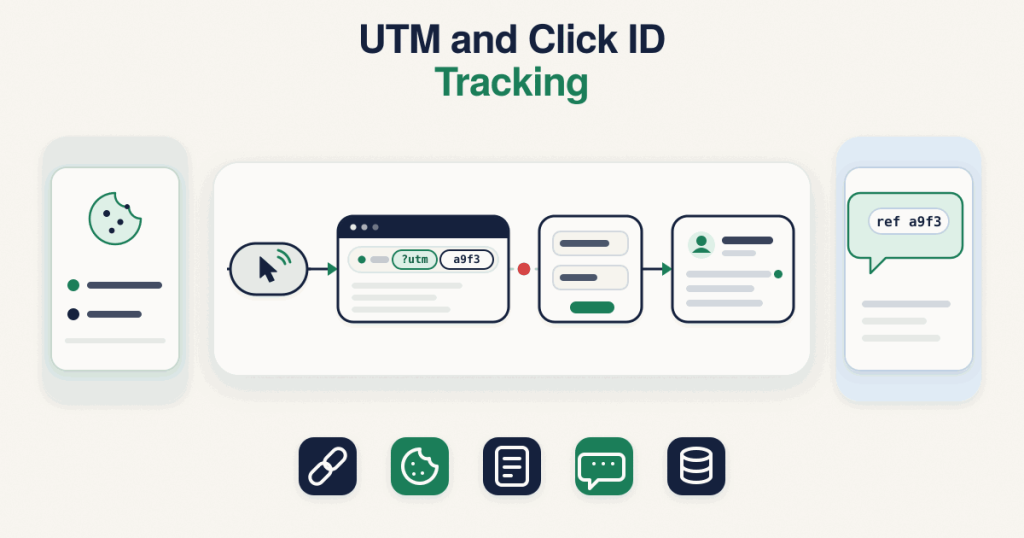
Two kinds of value tell you where a visitor came from, and they do different jobs.UTM parameters are the readable tags you add to a link yourself: utm_source, utm_medium, utm_campaign, and sometimes utm_term and utm_content. They describe the campaign in your own words, so a click can be reported as coming from, say, a Facebook lead campaign rather than just “social”. You control them, and they are the same for everyone who clicks that link.Click IDs are unique codes the ad platform adds to the destination URL on its own, one per click. Google adds gclid, Meta adds fbclid, TikTok adds ttclid, Microsoft adds msclkid, and other platforms add their own. Each one points back to a single click inside the platform, which is what lets a conversion be matched to the exact ad later.The important fact behind this whole UTM and click ID tracking guide is where these values live. They are in the URL, and only on the landing page, the first page the visitor opens. They are not stored anywhere by default, and they are not attached to a form submission on their own. The moment the visitor moves to another page, refreshes, or the URL is cleaned up, those values are no longer in front of you unless you captured and kept them. That is why source goes missing: not because tracking is broken, but because nobody saved the values while they were briefly available.The journey from ad click to lead, and the four places source gets lost
It helps to picture the full path a lead takes and mark where the source falls off. There are four common points.The first is the landing page itself. The values arrive in the URL, but if nothing reads and stores them in that first moment, they are lost as soon as the visitor does anything. Capturing them here is the foundation for everything else.The second is redirects and page changes. Many sites send the visitor through a redirect, a link shortener or a “go” URL before the real landing page, or move them from one page to another before the form. A redirect carries the query string, where UTMs and click IDs live, only if the redirect rule is set up to include it. If it is not, the parameters are dropped in transit and the real landing page never sees them. The deeper mechanics of this loss are covered in a separate write-up.The third is the form. A hidden form field is often added to carry the source into the CRM, which is the right idea, but a hidden field sends an empty value unless something actively fills it from the stored value first. An empty hidden field looks like tracking is in place while it quietly delivers nothing. How these fields are populated and mapped into a CRM is its own topic.The fourth is the WhatsApp handoff. When the call to action is a WhatsApp button instead of, or alongside, a form, the leap from the website to the chat is where source most often vanishes, because the chat app does not carry your page URL with it. This handoff, and what can and cannot be done about it, has its own detailed guide.Every one of the nine steps below exists to hold the source steady through one of these points.The 9 steps to keep campaign source from click to lead
This is the spine of the UTM and click ID tracking guide. Work through them in order, because each step depends on the one before it.Step 1. Capture the values on the landing page
As soon as the landing page loads, read the UTM parameters and any click IDs out of the URL. This has to happen on the first page the visitor opens, while the values are still present, and before they click away. Capturing here is what turns a fleeting URL into something you can use for the rest of the visit. My capture script does this read on page load as its first job.Step 2. Store them in a first-party cookie
Once read, the values need somewhere to live for the rest of the session and beyond, because the visitor may browse several pages or come back later before converting. A first-party cookie on your own domain is the usual home for them. Storing the values, rather than trying to read the URL again later, is what makes them available at the form or the button no matter how the visitor got there.Step 3. Record first touch and last touch
First touch and last touch are different records, and both are worth keeping. First touch is the campaign that originally introduced the visitor to you. Last touch is the most recent campaign before they converted. A visitor can arrive from one ad, leave, and return from another, and if you store only one of these you lose half the story. Keeping both means you can credit the campaign that started the relationship and the one that closed it. My capture script keeps first and last touch as separate stored values.Step 4. Keep the query string through redirects
If your traffic passes through any redirect before the real landing page, a link shortener, a “go” link, a consent or age gate, or a move from one page to another, make sure each redirect rule carries the query string forward. A redirect preserves UTMs and click IDs only when it is told to include them. Test the full path an ad actually takes, not just the final page in isolation, because the loss happens in the hop you are not looking at.Step 5. Fill hidden form fields from the stored value
Add hidden fields to your form for the source values, then fill them from the cookie you stored in step 2 before the form is submitted. The hidden field is only a container. Left to itself it submits an empty value, so the step that matters is populating it from the stored value at the right moment. Confirm a real value lands in each field on submit, rather than assuming the presence of the field means the data is flowing.Step 6. Pass the values into your CRM
A filled hidden field is only useful if your CRM actually receives and keeps it. Map each source field to a field on the contact or lead record in your CRM, so utm_source, utm_campaign, the click IDs and your first and last touch values all land somewhere you can see and report on. Many CRMs, connectors and form tools expose these as custom fields you set up once. This mapping is where the earlier steps turn into something your sales and reporting can use, and it has a dedicated write-up of its own.Step 7. Handle the website to WhatsApp handoff
When a visitor taps a WhatsApp button on your site, the browser opens the chat app, and your page URL does not travel with them. The deeper options for this, and their limits, are covered in website to WhatsApp attribution. The practical option is a click-to-chat link that carries a short reference inside the prefilled message text, so the first message can arrive with a code that ties back to the stored source. The honest limit, which this UTM and click ID tracking guide will not gloss over, is that the visitor can edit or delete that prefilled text before sending, so this matching is never guaranteed. It raises how often you can connect a WhatsApp lead to its campaign; it does not make it certain. There is also a separate value called ctwa_clid, which Meta provides only for Click-to-WhatsApp ads, not from a link on your website, so do not expect it to appear from an ordinary website button. The full handoff approach is its own guide.Step 8. Respect consent
Storing click IDs in a cookie may require visitor consent in some regions, so the capture should be consent-aware and wait for the appropriate signal before it stores anything. My capture script waits for consent by default. This is a compliance-sensitive area and the right setup depends on where your visitors are and the rules that apply to them, so treat consent as part of the design from the start rather than something added later.Step 9. Use a consistent naming convention
All of this only produces clean reports if your UTM values are named consistently. Facebook, facebook and FB are three different sources to a report, and mixed casing or ad hoc names scatter one campaign across several rows. Agree a simple convention, lowercase, no spaces, a fixed vocabulary for source and medium, and apply it to every link you build. A short naming guide of its own covers this in more depth, but even a one-page shared standard prevents most of the mess.A quick self-check
You can sanity-check your own setup without any tools. Click one of your own live ads, or paste a landing page URL with test UTM and click ID values into the address bar, then walk the path a real lead takes.- Do the UTM parameters and click IDs appear in the URL on the landing page?
- After you move to another page, is the stored value still there, for example in a first-party cookie?
- When you submit the form, do the hidden fields carry real values and not blanks?
- Does the lead arrive in your CRM with the source fields filled in?
- If you use a WhatsApp button, does the first message carry your reference, and do you accept that some visitors will remove it?
- Are your UTM values named the same way every time?