ChatGPT Ads Tracking: Complete Guide to 3 Tools and 13 Events
Table of Contents
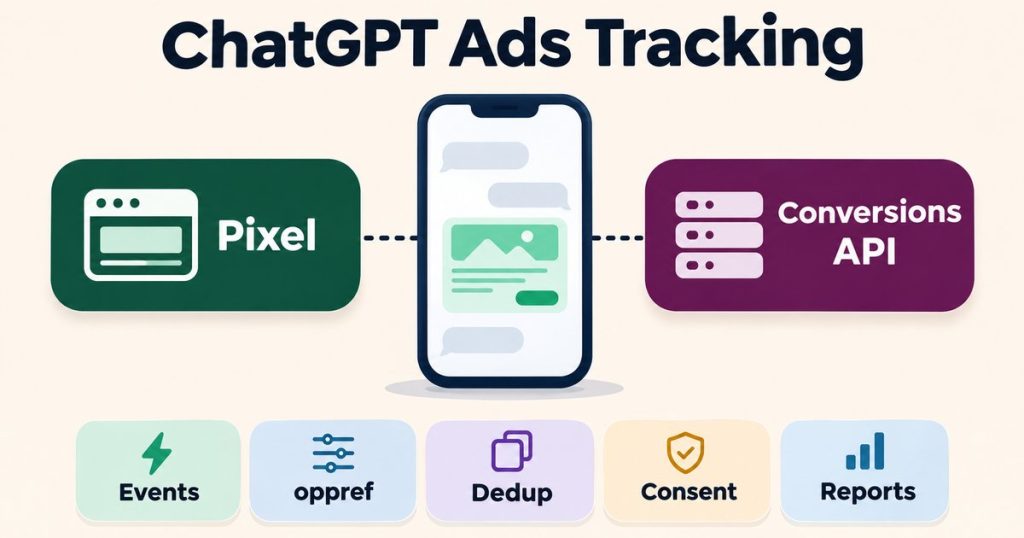
ToggleChatGPT Ads tracking is how you tell OpenAI which clicks from ChatGPT turned into leads, sign-ups and sales. OpenAI gives you three ways to send that data: the Measurement Pixel in the browser, the Conversions API from your server, and an image tag for pages that cannot run JavaScript. Each one does a different job, and the gaps between them are where most setups lose conversions.
Getting ChatGPT Ads tracking right before launch matters more than on most ad platforms. According to OpenAI’s documentation, a conversion-optimized campaign supports exactly one active standard conversion event, and you cannot change the goal or event after the campaign is created. If the event is wrong, missing or double counted on day one, you rebuild the campaign rather than fix a setting.
This guide follows OpenAI’s official documentation. It covers the three building blocks, the supported events, the oppref click reference, deduplication, consent, attribution and reporting, testing, who owns which account, and the most common problems grouped by symptom. I apply the same server-side tracking practice I use for Meta Conversions API, Google Ads, TikTok Events API, GA4, Google Tag Manager, CRM webhooks and Consent Mode v2 to OpenAI’s Pixel and Conversions API.
The three building blocks of ChatGPT Ads tracking
The Measurement Pixel is a script loaded from OpenAI’s CDN (bzrcdn.openai.com). It reads the ad click reference from the landing URL, stores it in first-party cookies, and sends the events you fire. Nothing is sent on its own: per OpenAI’s documentation, events are fired explicitly, and that includes page_viewed. If you only paste the base code, you collect nothing.
The Conversions API sends events from your server with a POST request to https://bzr.openai.com/v1/events, with the Pixel ID as a query parameter and a separate Conversions API key. OpenAI’s documentation is clear that this key belongs on the server: never call the Conversions API from browser code. Use it for events the browser never sees, such as a paid order confirmed by a webhook, a lead qualified in a CRM, or an app install.
The image tag is a no-JavaScript fallback. It loads with the page, sends one event per request, and does not support a user object. It cannot measure clicks or form submissions, so it fits a simple thank-you page and little else.
| Tool | Runs in | Best for | Limits |
|---|---|---|---|
| Measurement Pixel | Browser | Page views, add to cart, checkout steps, capturing oppref | Blocked by denied consent, ad blockers and closed tabs |
| Conversions API | Your server | Confirmed orders, CRM leads, delayed sales, app events | Does not capture oppref, needs the key kept server side |
| Image tag | Page load | A simple conversion page without JavaScript | One event per request, no user object, no interactions |
For most businesses, reliable ChatGPT Ads tracking uses the Pixel and the Conversions API together. OpenAI’s Conversion-Optimized Campaigns guide says the Conversions API is a more reliable tracking source than the pixel alone, and the Pixel is still the simplest way to capture the click reference on the landing page.
Supported events and event data
OpenAI supports 13 event types:
page_viewed,contents_viewed,items_added,checkout_started,order_createdlead_created,registration_completed,appointment_scheduledsubscription_created,trial_startedcustom, for a conversion that no standard event describesapp_installedandapp_opened, sent only through the Conversions API with themobile_appsource
Two rules catch people early. Amounts are integers in minor currency units, so 49.99 US dollars is sent as 4999, not 49.99. And if an event has an amount, it must also have a currency.
Plan around what is missing, too. There is no refund event, and subscription_created marks the start of a subscription only, with no renewal event. If your business depends on refunds or renewals, your ChatGPT Ads tracking will report the first sale, and the true value has to come from your own data.
For apps, OpenAI works with mobile measurement partners, and its help center says mobile app attribution through these integrations is click-based. App measurement has its own rules, so treat it as a separate project from website tracking.
oppref: the click reference that makes ChatGPT Ads tracking work
When someone clicks a ChatGPT ad, the landing URL carries an oppref parameter. That value ties every later conversion back to the ad click. The Pixel captures it automatically and stores it in a first-party cookie, __oppref, for 30 days. It also sets __obref, a browser reference kept for 365 days.
The Conversions API does not capture oppref. Your server only knows it if you saved it. The working pattern is simple: read oppref on the landing page, store it with the lead, cart or order in your own database, and send it back unchanged with every server event for that person. Do not shorten it, decode it or rebuild it.
There is also a timing rule. When you send an event, its timestamp must be within the last 7 days and no more than 10 minutes in the future. So 7 days is the maximum age of an event at the moment it is sent, not a limit on how long after the click a sale can happen. A sale that closes on day 12 after the click, for example a B2B lead that converts after a sales call, is accepted if you send it right away. The click window can be up to 30 days, so store oppref with the lead for that long.
The real risks are events that sit too long before sending: a nightly or weekly batch, a retry queue that keeps failing, or a CRM export you backfill later. Anything sent more than 7 days after it happened is rejected. For reliable ChatGPT Ads tracking, send sales events as they happen, not in a late batch, and when you retry, reuse the same event ID and the original timestamp.
Deduplication in ChatGPT Ads tracking
When the Pixel and the Conversions API send the same purchase, OpenAI needs to know it is one purchase. Its deduplication key is the Pixel ID, the event name and the event ID, plus custom_event_name for custom events. The first event received wins, and later copies are dropped.
The field names differ: the Pixel uses event_id, and the Conversions API uses id. The value inside must be identical. Use one ID you already have, such as the order number, and pass it to both sides.
Common mistakes:
- Generating a random ID on each side, so nothing ever matches and every sale counts twice.
- Retrying a failed server request with a new ID. Retries must reuse the same ID.
- Sending the same order under two event names, for example
checkout_startedfrom one side andorder_createdfrom the other. - Splitting a batch badly. A batch can hold up to 1,000 events and is accepted or rejected as a whole, so one bad event can block the rest.
Consent: what the Pixel does and what your server must do
The Pixel’s consent setting defaults to true. When a visitor denies consent, the Pixel stops sending events and deletes both the __oppref and __obref cookies. Events blocked while consent was denied are not replayed if consent is granted later.
Your server has no such switch. If you send events through the Conversions API, your code has to check the same consent state before it sends anything, and stop sending the obref value once consent is withdrawn. This is the part most setups forget: the banner controls the browser, but the server keeps sending.
Hashed user fields follow strict rules too. Each one accepts a list of at most three values, and more than three returns HTTP 400.
Attribution and reporting
Attribution in ChatGPT Ads tracking depends on two reporting settings. According to OpenAI’s Reporting documentation, the click window can be 7, 14 or 30 days and defaults to 30, and the view window can be 0 or 1 day and defaults to 1. How view-through is counted depends on that view window: with 1 day, the Conversions total combines click-through and eligible view-through conversions, and with 0 days it counts click-through only. OpenAI’s help article on troubleshooting conversion tracking describes the same rule. Check which windows your account uses, and use the same windows whenever you compare tools.
Conversions also update through daily processing, and OpenAI’s documentation says to allow at least one day for conversion data to appear. Recent numbers can still change as more events arrive.
That is why the numbers rarely match across tools. Ads Manager counts conversions inside its own click and view windows and dedupes them. Your analytics tool probably uses a different model and window. Your CRM records every sale when it closes, while a server event sent more than 7 days late never reaches Ads Manager. Consent denials remove events from one tool and not another. Before you call ChatGPT Ads tracking broken, compare the same event, the same date range and the same window, and allow for the reporting delay.
One more limit for campaigns: an oCPC campaign optimizes toward exactly one active standard event. Custom events can be counted as conversions, but custom event settings are not supported as optimization goals. OpenAI’s Conversion-Optimized Campaigns guide also says conversion bidding must be enabled on the account, and that OpenAI charges only when a valid click occurs.
Testing your ChatGPT Ads tracking
OpenAI documents a few ways to check events before you trust them:
- validate_only on the Conversions API checks events without saving them, so you can test your payloads safely.
- The conversion events endpoint in the Conversion Setup API returns up to 50 events received from the Pixel during the previous 15 minutes. It is available only to enabled accounts, and returns 404 otherwise.
- Your browser’s network tab shows whether the Pixel fires the event you expect, with the right event ID.
An honest note: all of these need an ad account with a Pixel ID and a Conversions API key. You can write and review the code without one, but you cannot confirm delivery to OpenAI until the account exists.
Who owns what
OpenAI’s help center tells you to create a separate ad account for each advertiser, and to ask an administrator of an existing account to invite you. So the business owns its advertiser account and invites the people who work on it, including an agency or a consultant. OpenAI’s help article on managing identity and access for Ads Manager adds that a ChatGPT workspace or API Platform organization role does not grant Ads permissions.
The Conversions API key stays on the server, in an environment variable or a secret store, never in browser code, a tag in a public container or a shared document. If you use Google Tag Manager, Stape publishes a tag for the OpenAI Pixel in web GTM and a Conversions API tag for server-side GTM. They are one option among several, and the same rules on oppref, deduplication and consent still apply.
Common ChatGPT Ads tracking problems by symptom
- No conversions at all: the Pixel loads but no event is fired, the event name is not a supported name, or the server sends to the wrong Pixel ID. Error troubleshooting and testing without ad spend get their own guides in this series.
- Conversions show but are not tied to ads: oppref is not stored or not sent back with server events. Capturing and replaying oppref is covered in its own guide.
- Every sale counts twice: the Pixel and the server use different event IDs, or retries create new ones. Deduplication has its own guide.
- Events disappear after a consent banner change: denied consent deletes the cookies, and the server keeps sending without checking. Consent on server events has its own guide.
- Late sales never appear: the event is sent more than 7 days after the sale happened, for example from a delayed batch or a backfill, and is rejected. Or oppref was not stored with the lead, so the server has nothing to send back.
- Platform setups: Shopify and WordPress each have their own quirks, and each gets a separate guide.
When to get help with ChatGPT Ads tracking
If you are planning a new setup, the ChatGPT Ads conversion tracking service covers the Pixel, the Conversions API, oppref storage, deduplication and consent from the start. If tracking is already live and the numbers look wrong, the ChatGPT Ads tracking audit reviews your setup and gives written findings. Both pages have a Request a quote button, and all work is handled in writing.
Frequently asked questions
What do I need for ChatGPT Ads tracking: the Pixel, the Conversions API or both?
Most businesses need both. The Pixel captures oppref on the landing page and tracks browser events. The Conversions API sends confirmed orders and leads from your server, and OpenAI calls it a more reliable tracking source than the pixel alone.
Does the Conversions API capture oppref automatically?
No. Only the Pixel captures oppref. Your server has to store it with the lead or order and send it back unchanged with each Conversions API event.
How does OpenAI deduplicate Pixel and Conversions API events?
By Pixel ID, event name and event ID, plus the custom event name for custom events. The first event received wins. The Pixel field is event_id and the Conversions API field is id, and both must carry the same value.
Can I track refunds or subscription renewals?
Not as events. OpenAI has no refund event, and subscription_created marks the start of a subscription only, with no renewal event.
Can a custom event be the goal of a conversion-optimized campaign?
No. Custom events can be counted as conversions, but an oCPC campaign supports exactly one active standard conversion event, and the goal cannot be changed after the campaign is created.
Why do ChatGPT Ads conversions differ from my analytics or CRM?
Each tool uses its own windows and model. Ads Manager uses the account’s click and view windows, and with a 1 day view window its Conversions total includes eligible view-through conversions. Conversions update through daily processing, server events sent more than 7 days after they happened are rejected, and denied consent removes events from some tools only.
Can I test ChatGPT Ads tracking without running ads?
Partly. The Conversions API’s validate_only option checks events without saving them, and the conversion events endpoint shows recent Pixel events on enabled accounts. Both need an ad account with a Pixel ID and a Conversions API key. OpenAI’s documentation does not say whether a live campaign is required.
Final thoughts
Good ChatGPT Ads tracking comes down to a few decisions made before launch: which standard event is the goal, where oppref is stored, which ID both sides share, and how the server follows consent. Get those right, follow OpenAI’s Ads developer documentation for the details, and the numbers in Ads Manager will be numbers you can act on.