How to use the CAPI debugger
- Paste one event payload or a full request as JSON, paste a curl command, open a file, or paste the response Meta gave you.
- Read the findings. Each one says what is wrong, how to fix it and why it matters.
- Apply the fix, copy the corrected payload, and confirm it with a test event.
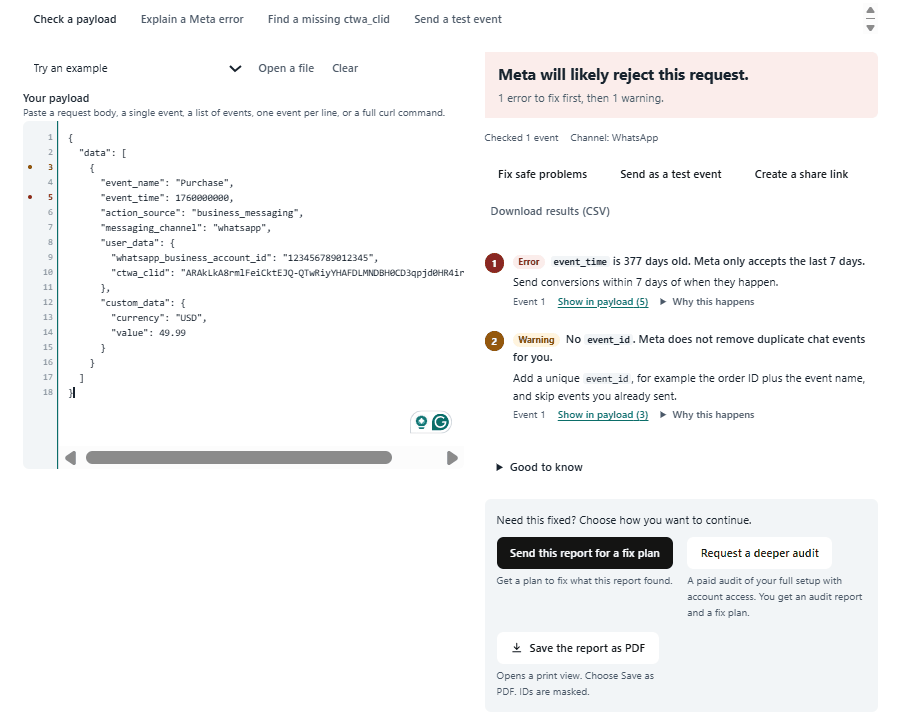
A sample result: each finding names the field, the cost and the fix.
The CAPI debugger can also suggest a corrected payload, decode Meta’s error response, walk you through a missing ctwa_clid with a few questions, and export the result as a CSV or a PDF.
WhatsApp CAPI not working? What this CAPI debugger looks for
The CAPI debugger runs 56 checks, grouped by what they look at:
- The request: invalid JSON, events wrapped in a second data list, more than 1,000 events in one request, duplicate keys, a curl command with no readable body, and an access token left in the pasted text.
- Every chat event:
action_sourceormessaging_channelmissing or wrong (the channel must bewhatsapp,messengerorinstagram, in lowercase), a missing or unsupported event name, event names in the wrong case, and a missingevent_id. - Website fields in a chat event: website fields that cause chat events to be rejected, and browser cookie values that are not used for chat events.
- WhatsApp:
ctwa_clidmissing, hashed, or carrying spaces or quote marks, andwhatsapp_business_account_idmissing or not digits only. - Messenger and Instagram:
page_id,page_scoped_user_id,instagram_business_account_idorig_sidmissing or hashed, and fields from one channel sent inside an event for another. - Value and currency: a missing or invalid currency code, a value sent as text, a Purchase with no value, and a value that is the price times 1,000 because it came from Meta’s automatic events webhook.
- Event time: missing, in milliseconds, in the future, or older than the 7 days Meta accepts, and events sent more than 7 days after the ad click, which are accepted but not credited to the ad.
- The whole batch: the same
event_idused twice, the same conversion sent twice, and channels mixed in one request.
Click-to-WhatsApp conversions not tracking: why ctwa_clid goes missing
ctwa_clid is the only link between a WhatsApp chat and the ad that started it. It arrives in the referral object of the first message after the ad click. Save it then, and send it with every later conversion from that chat.
It often never reaches your system for one of these reasons:
- The number runs on the WhatsApp Business app alone, which has no webhooks.
- An unofficial or QR-code API connection is used, and these do not receive the ad referral.
- The value is read from the wrong part of the webhook instead of the referral object of the first message.
- The ad ran in WhatsApp Status. Meta says ctwa_clid is omitted for messages that come from a Status ad, so those chats arrive with no click ID. Break results down by placement in Ads Manager to see how many chats came from Status.
Send the value exactly as it arrived. Never hash a click ID. If your chats now arrive without a phone number, see the WhatsApp BSUID checklist.
Messenger and Instagram Conversions API events
Messenger has no click ID. Messenger events are matched through the Page the chat happened on, using page_id and page_scoped_user_id, the sender ID from the Messenger webhook. Instagram events use instagram_business_account_id and the sender’s ig_sid. The CAPI debugger flags WhatsApp fields found in a Messenger event, and the other way round, because one template is often reused across channels.
Events received but nothing in Events Manager
A successful response only tells you Meta received the request. It does not tell you the event was matched to an ad. Each WhatsApp Business Account, Page and Instagram account has its own dataset, so an event sent to the wrong dataset fails. For example, sending a Messenger page_id to a WhatsApp dataset can return “No Page associated to the dataset”. Paste Meta’s response into the decoder tab to see the exact error and what to change.
What this CAPI debugger does not do
It reads the payload. It cannot see whether the request reached Meta, how your webhook is timed, the settings in your dashboards, or how Meta decides to attribute a conversion. A clean result means the payload follows the rules. Use the test event tab to confirm that Meta records it.
Privacy: what stays in your browser
- The CAPI debugger checks a payload entirely in your browser. Nothing is uploaded.
- A report is saved on this site only if you create a share link, or contact me about a fix from the fix plan page.
- A saved report has IDs masked and email, phone and access tokens removed. It is deleted after 30 days, or earlier by the person who created the link.
- Access tokens are never stored. The test event tab sends from your browser straight to Meta.
Need help fixing what it found?
If the findings are more than you want to fix yourself, use the buttons under the results to request a written fix plan. Everything is handled in writing, with no calls. You can also read about my WhatsApp conversion tracking setup service.
Frequently asked questions
What does this CAPI debugger check?
It runs 56 checks on Conversions API events for chats that start from Meta ads: WhatsApp, Messenger and Instagram. It looks at the request structure, action_source, messaging_channel, the IDs each channel needs, ctwa_clid, event names, event_id, value and currency, and event time, and it explains each problem with a fix.
Can I use it for website pixel or purchase CAPI events?
No. It is built for business messaging conversions only, which are events with action_source set to business_messaging. For website and app events, use Meta’s Payload Helper.
Why is ctwa_clid missing from my Click-to-WhatsApp events?
ctwa_clid arrives in the referral object of the first message after an ad click. It is often missing when the number runs on the WhatsApp Business app alone, when an unofficial or QR-code API is used, or when the value is read from the wrong part of the webhook. Ads that run in WhatsApp Status are another documented cause: Meta omits ctwa_clid for messages that come from a Status ad.
Should I hash ctwa_clid or the Messenger and Instagram chat IDs?
No. Send them exactly as they arrived in the webhook. Hashing is for email and phone, and a hashed click ID or chat ID matches nothing.
Why are my chat events rejected?
Common causes are website fields inside a chat event, an event_time older than 7 days or in milliseconds, a wrong or missing action_source or messaging_channel, and invalid JSON. One invalid event can also fail the whole request. Paste the request into the CAPI debugger to see which of these applies.
My events are received but nothing shows in Events Manager. Why?
A successful response only means Meta received the request. It does not mean the event was matched to an ad. Common causes are a missing click or chat ID, the wrong dataset for the channel, and a wrong or missing action_source or messaging_channel. Paste Meta’s response into the decoder tab to see the exact error.
Does a clean result mean Meta will attribute my chat conversions?
No. A clean result means the payload follows the rules the checker knows. Delivery, webhook timing, dashboard settings and Meta’s own attribution decisions happen outside the payload, so confirm the result with a test event.
Is my payload uploaded when I use the CAPI debugger?
No. Every check runs in your browser. A report is saved on this site only if you create a share link or contact me from the fix plan page, and then it is stored with IDs masked and email, phone and access tokens removed, and deleted after 30 days. If you use the test event tab, your browser sends that request straight to Meta and your token never reaches this site.
Read more in Meta’s business messaging Conversions API documentation.
The same rules apply whether you are fixing Messenger CAPI or Instagram CAPI. Paste one event and the debugger shows which ID field is missing for that channel.
About the Author
Built by Al-Fahad Hridoy, an Attribution & Tracking Consultant who sets up WhatsApp, Messenger and Instagram conversion tracking with the Meta Conversions API. Every check in this debugger is based on Meta’s official documentation, so you can verify each rule yourself.
Meta, WhatsApp, Messenger and Instagram are trademarks of their respective owners. This is an independent tool and is not affiliated with or endorsed by Meta.