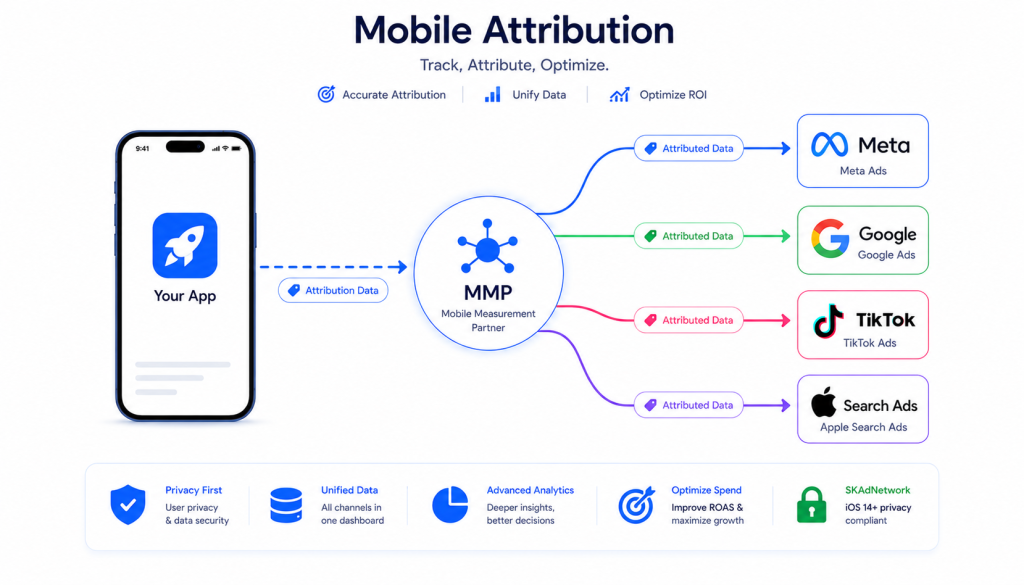
Mobile attribution is one of those topics that sounds straightforward until you are actually trying to implement it. Every mobile growth team needs it, but most teams either set it up wrong or do not fully understand what is happening under the hood.
This guide covers exactly what mobile attribution is, how it works step by step, the key concepts you need to understand, and how to choose the right setup for your app.
Table of Contents
ToggleWhat is Mobile Attribution?
Mobile attribution is the process of identifying which marketing channel, campaign, or ad creative drove a specific user action in a mobile app — most commonly an install, in-app purchase, or registration.
When someone sees your ad on Facebook, clicks it, installs your app, and makes a purchase, mobile attribution connects those four events into a single user journey and assigns credit to the right source. Without it, you know your campaigns are running but you have no reliable way to tell which ones are actually working.
Every mobile growth decision — where to spend your ad budget, which creatives to scale, which channels to cut — depends on attribution data being accurate.
Why Mobile Attribution Matters
Without attribution, you are running your user acquisition completely blind. You can see how much you are spending on each channel, but you cannot see which channels are actually returning that spend.
Here is what happens when attribution is broken or missing:
Wasted budget: Ad platforms optimize toward whatever conversion signals they receive. If your attribution is missing events or attributing conversions to the wrong source, your Meta or Google campaign is optimizing on bad data. You end up scaling what looks good in the ad platform dashboard, not what is actually driving revenue.
Blind scaling: Growth teams that scale without attribution data typically find out months later that their best-performing channel on paper was responsible for a fraction of actual revenue. By then, a significant portion of the budget has already been misallocated.
No LTV visibility: Without attribution connected to revenue events, you cannot calculate channel-level lifetime value. You know your cost per install but not your revenue per install by source. These two numbers together are what determine whether a channel is profitable.
Broken retargeting: Re-engagement campaigns need to know which users installed from which source, which events they completed, and what stage they are at in the funnel. Without attribution data, retargeting segments are unreliable.
How Mobile Attribution Works
Mobile attribution follows a consistent sequence of events. Here is what happens from the moment a user sees an ad to the moment credit is assigned:
Step 1: User sees and clicks an ad
A user sees your app install ad on Meta, Google, TikTok, or any other ad network. They click the ad.
Step 2: Click data is recorded
The ad network records the click and appends click parameters to the destination URL — typically a click ID specific to that network (gclid for Google, fbclid for Meta, and so on).
Step 3: MMP captures the click
The click lands on a tracking link managed by your Mobile Measurement Partner (MMP) — AppsFlyer, Adjust, Singular, or Branch. The MMP logs the click, the timestamp, the device information, and the channel it came from.
Step 4: User installs the app
The user is redirected to the App Store or Google Play. They install the app.
Step 5: SDK fires on first open
When the user opens the app for the first time, the MMP SDK (embedded in your app code) fires an install event. This event includes device identifiers available under the current privacy framework.
Step 6: MMP matches install to click
The MMP compares the install event against its recorded clicks. Using deterministic matching (device ID match) or probabilistic matching (fingerprint-based), it identifies which click this install belongs to.
Step 7: Attribution is assigned
The MMP assigns credit to the matched channel, campaign, and creative. This data flows into your MMP dashboard and back to the ad network as a postback, confirming the conversion.
Step 8: In-app events are tracked
Every subsequent user action — registration, first purchase, subscription, level completion — is tracked by the MMP SDK and attributed back to the original install source. This is how you get channel-level revenue and LTV data.
Key Mobile Attribution Concepts
Attribution Window
The attribution window is the time period during which an install can be credited to an ad click or view. If a user clicks your ad and installs within the window, the install is attributed. If they install after the window closes, it is counted as organic.
Common attribution window settings:
- Click-through window: 7 days (standard), 1 day or 30 days depending on channel
- View-through window: 1 day (standard for most networks)
Attribution windows are configurable in your MMP. Mismatched windows between your MMP and your ad network are one of the most common causes of data discrepancies.
Deterministic vs Probabilistic Attribution
Deterministic attribution uses a unique identifier to make an exact match between a click and an install. On Android, this is the Google Advertising ID (GAID). On iOS pre-ATT, this was the IDFA. When a device ID match is available, attribution is certain.
Probabilistic attribution (also called fingerprinting) uses non-unique signals — IP address, device model, OS version, screen resolution, timestamp — to make a statistical match when no device ID is available. It is less precise than deterministic attribution and Apple now explicitly prohibits it on iOS for privacy reasons.
Attribution Models
Attribution models determine which touchpoint in a user journey gets credit for a conversion.
Last click: The last ad click before install gets 100% of the credit. This is the default model for most MMPs and ad networks.
First click: The first ad click in the user journey gets 100% of the credit. Useful for understanding which channel introduced the user to your app.
Multi-touch: Credit is distributed across multiple touchpoints based on a predefined rule (linear, time decay, position-based). Gives a more complete picture of the conversion path but requires more data and complexity to interpret.
Data-driven: The model uses machine learning to assign credit based on historical conversion patterns. Available in some MMPs and ad platforms, but requires sufficient conversion volume to be accurate.
View-Through Attribution (VTA)
View-through attribution assigns credit to an ad that was seen but not clicked, if the user later installs the app within the attribution window. It captures the influence of impressions that did not result in a direct click but may have contributed to the install decision.
VTA is controversial because it inflates attributed installs and can make channels look more effective than they are. Most teams use a short VTA window (1 day) or disable it entirely for channels where impression data is unreliable.
iOS vs Android Attribution
The privacy changes introduced by Apple in 2021 created a significant split between how iOS and Android attribution work. Understanding this difference is now essential for any app team running paid campaigns.
iOS Attribution After ATT
Apple’s App Tracking Transparency (ATT) framework requires apps to ask users for permission to track them across apps and websites. Users who decline (the majority do) cannot be tracked using their IDFA.
This created three major changes for iOS attribution:
Deterministic attribution is limited. Without IDFA access, MMP cannot make exact device-level matches for users who declined ATT. Attribution for these users must rely on aggregated or probabilistic methods.
SKAdNetwork (SKAN) is now required. Apple’s privacy-preserving attribution framework, SKAdNetwork (SKAN), provides aggregated install and conversion data without exposing individual user identities. SKAN 4.0 (the current version) supports up to 64 conversion values, coarse and fine value reporting, and re-engagement measurement. Configuring SKAN correctly — including conversion value schema design, postback window settings, and Info.plist SKAdNetwork ID management — is now a core part of iOS attribution setup.
Apple’s official SKAdNetwork documentation covers the full postback specification and supported conversion value ranges. You can review it at Apple’s SKAdNetwork developer documentation.
Fingerprinting is banned on iOS. Apple explicitly prohibits probabilistic attribution (fingerprinting) for apps that use the App Store and AppTrackingTransparency framework. MMPs that offer fingerprinting on iOS are doing so in violation of Apple’s policies.
The practical result: iOS attribution is now a combination of deterministic data (from users who granted ATT permission) and aggregated SKAN data (from users who declined). The two datasets need to be combined carefully to get an accurate picture of campaign performance.
Android Attribution
Android attribution is comparatively straightforward. Google Advertising ID (GAID) is available for users who have not opted out, enabling deterministic device-level attribution. Google has been working on its own privacy-preserving framework (Privacy Sandbox for Android), but it has not yet reached the same level of disruption as iOS ATT.
For Android, standard MMP setup with GAID-based deterministic attribution still works reliably for the majority of users.
What is an MMP?
A Mobile Measurement Partner (MMP) is a third-party platform that handles mobile attribution. MMPs are neutral — they are not the advertiser or the ad network, so they can provide an independent view of which channels are driving installs and conversions. This neutrality is important because ad networks are incentivized to over-report their own performance.
The major MMPs and how they compare:
| MMP | Best For | Key Strengths | Pricing |
|---|---|---|---|
| AppsFlyer | Large-scale UA campaigns | Widest ad network integrations, advanced fraud protection, strong SKAN tooling | Higher cost, scales with attribution volume |
| Adjust | Mid-market apps | Clean interface, reliable data, strong automation features, good SKAN support | Mid-range, predictable pricing |
| Singular | Apps needing cost aggregation | Combines attribution with ad spend data across all networks, strong ROI reporting | Competitive for combined attribution + cost |
| Branch | Apps with deep linking needs | Industry-leading deep linking, cross-platform journeys, web-to-app attribution | Modular pricing depending on features used |
All four integrate with the major ad networks (Meta, Google, TikTok, Apple Search Ads, Snapchat) and support SKAdNetwork for iOS.
Common Mobile Attribution Problems
Even with an MMP in place, attribution setups break in predictable ways. These are the most common problems:
Data discrepancy between MMP and ad platform
Your MMP shows 500 installs from Meta. Meta Ads Manager shows 800 conversions. This gap is normal to a point — a 10-20% difference is expected due to attribution window differences, deduplication, and view-through counting. A gap above 30% usually means something is fundamentally misconfigured: mismatched attribution windows, duplicate postbacks, or incorrect event mapping.
High percentage of unattributed installs
If 40-60% of your iOS installs are showing as organic when you are running paid campaigns, your SKAN setup is likely incomplete. Missing SKAdNetwork IDs in Info.plist, incorrect conversion value schema, or postback validation failures are the most common causes.
SKAN postbacks not arriving
SKAN postbacks are sent by Apple, not your app or MMP. If postbacks are empty after 72 hours, the issue is usually one of three things: SKAdNetwork IDs missing in Info.plist, the app not calling the correct SKAN API method to update conversion values, or the MMP not being registered as the attribution partner in the ad network settings.
Revenue events not appearing in MMP
In-app purchase events fire in the app but do not show up in the MMP dashboard. Common causes include incorrect event parameter mapping, using a deprecated SDK method, or a mismatch between sandbox and production environments during testing.
Inflated install counts
Install numbers are significantly higher than your actual user base suggests. This is often a fraud signal — click flooding or install hijacking. A properly configured MMP with fraud protection enabled should flag and filter these, but the rules need to be correctly set up.
How to Choose the Right Attribution Setup
The right attribution setup depends on your app, your channels, and your team’s technical capacity. Here is a practical decision framework:
If you are just starting out and running campaigns on Meta and Google:
Start with AppsFlyer or Adjust. Both have solid documentation, broad ad network support, and handle SKAN out of the box. AppsFlyer has more integrations; Adjust is easier to manage for smaller teams.
If your primary channel is Apple Search Ads:
AppsFlyer and Adjust both have strong Apple Search Ads Attribution API integration. Make sure whichever MMP you choose supports the Apple Ads Attribution API in addition to SKAN.
If cost aggregation across networks matters:
Singular is worth evaluating. It combines attribution data with ad spend data from all your networks, which eliminates the need for a separate cost aggregation tool.
If deep linking and web-to-app journeys are central to your product:
Branch’s deep linking capabilities are the best in the market. If your app relies heavily on deferred deep links or cross-platform user journeys, Branch is the right choice.
If you have a complex iOS setup with high install volume:
Invest in proper SKAN configuration regardless of which MMP you use. This means conversion value schema design, postback validation, and making sure your Info.plist includes every ad network’s SKAdNetwork ID.
If your numbers are not adding up:
Run an attribution audit before adding more tools. Most attribution problems are not tool problems — they are configuration problems in the existing setup.
Frequently Asked Questions
What is the difference between mobile attribution and mobile analytics?
Mobile analytics tracks user behavior inside your app — sessions, events, funnels, retention. Mobile attribution tracks where your users came from before they installed your app. Attribution answers “which channel drove this install and purchase?” Analytics answers “what did this user do inside the app?” Both are part of a complete mobile measurement stack, but they serve different purposes and use different tools.
Do I need an MMP if I am only running campaigns on one network?
If you are only running Apple Search Ads and nothing else, you can use Apple’s native attribution API directly. But as soon as you add a second channel — Meta, Google, TikTok — you need an MMP to get a unified, deduplicated view of installs across all sources. Running without an MMP when using multiple networks means each network will take credit for every install it touches, leading to inflated numbers across the board.
What is the difference between SKAN and standard mobile attribution?
Standard attribution uses device-level data (IDFA or GAID) to make exact matches between clicks and installs. SKAN is Apple’s privacy-preserving alternative — it provides aggregated install and conversion data without exposing individual user identities. SKAN data is delayed (postbacks arrive after a timer window), less granular, and subject to crowd anonymity thresholds. For iOS, you need both: deterministic attribution for users who granted ATT permission, and SKAN data for everyone else.
How long does it take to set up mobile attribution?
A basic MMP setup (SDK integration, ad network connections, event mapping) for a single platform (iOS or Android) takes 1-2 weeks including testing. A full setup covering iOS SKAN configuration, Android, multiple ad networks, and in-app revenue events typically takes 2-4 weeks. Auditing and fixing an existing broken setup usually takes 1-2 weeks depending on how many layers are misconfigured.
Why do my MMP and ad platform numbers never match exactly?
They are not supposed to match exactly. MMPs and ad platforms count conversions differently: different attribution windows, different rules for view-through attribution, different deduplication logic, and different timestamps for when a conversion is counted. A 10-20% discrepancy is expected and normal. What you are looking for is consistency in the gap — if the percentage difference stays roughly the same week over week, your setup is working correctly. If the gap jumps significantly or reverses, something has changed in your configuration or the ad network’s reporting.
What should I do if my iOS attribution is broken after an ATT update?
Start with these checks in order: confirm that your MMP SDK is updated to the latest version, verify that all relevant SKAdNetwork IDs are in your Info.plist, check that your app is calling the correct SKAN API method to register conversion values, confirm that postback validation is enabled in your MMP settings, and check that your ad network is registered as an attribution partner in your MMP. If postbacks are arriving but conversion values are all zero, the issue is in your conversion value schema design.